Fast Ethernet : 100 Mbps (half duplex), 200Mbps (full
duplex)
ConnecteurRJ-45 ; Auto-MDIX sur tous les ports
Adresse MACTable d'adresses 1K Mac
Tampon mémoireES-105A: 64 KB
ES-108A: 96 KB
Câble réseau
(Jusqu'à 100m ou 328
pieds)
10BASE-T : 100Ω 2-paires UTP/STP Cat. 3, 4, 5
100BASE-TX : 100Ω 2-paires UTP/STP Cat. 5
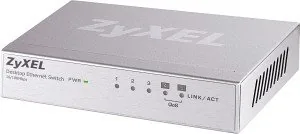
Voyant DELPar port: LINK/ACT
Par unité: PWR
Alimentation électrique 5VDC 0.6A
Température De fonctionnement: 0º C~ 50º C (32º F ~ 122º F)
Humidité (Sans
condensation)
En fonctionnement: 10% ~ 90%
Dimensions194 x 85 x 25 mm (Long x Larg x Haut)
EMI & SécuritéFCC Class B, CE, C-Tick
ITALIANO
Non ostruire i fori per la ventilazione.
/2
%
Controllo rapido
Non sono un robot
Risposta errata, riprova.
Chatta con il manuale del tuo Zyxel ES-105A utilizzando l'IA
Ottieni risposte istantanee dall'IA dal manuale del tuo Zyxel ES-105A
Chiedi qualsiasi cosa sul Zyxel ES-105A. Le risposte provengono da questo manuale, con le pagine di riferimento.
Fai una Domanda
0/1000
Consigli ES-105A?
SìNo
0
Lukas Wagner
10 mesi fa
I saw reviews saying the included power adapters fail within about a year and that the switch only supports 10/100 Mbps. Is this expected, and what should I do to prevent adapter issues?
0
Manual.ly
9 mesi fa
L'unita' e' uno switch 10/100 Mbps (Fast Ethernet), quindi non supporta velocita' Gigabit. Per quanto riguarda l'alimentatore: il guasto dell'alimentatore e' il problema piu' segnalato, quindi raccomandiamo di usare l'alimentatore originale (o un equivalente correttamente dimensionato con voltaggio e corrente DC corrispondenti), di posizionare lo switch in un luogo con buona ventilazione e di mantenere la temperatura ambiente entro le specifiche del prodotto (evitare fonti di calore come radiatori o spazi chiusi). Se il vostro alimentatore si guasta, vi preghiamo di contattare il supporto con i dettagli del vostro ordine e una breve descrizione (e foto se possibile). Se e' entro il periodo di garanzia, possiamo organizzare una sostituzione o il rimedio appropriato.
M: OA-GPT-5-NAN
M: OA-GPT-5-NAN
Domande
frequenti
A
El ES-10 incluye cinco puertos RJ-45 10Base-T/100Base-TX que negocian automáticamente y soportan Auto-MDI/MDIX, permitiendo la conexión con cables directos o cruzados y la detección automática de velocidad/duplex.
Questa risposta è utile?
A
El ES-10 es plug-and-play sin configuración requerida. Conecte los dispositivos con cables Ethernet, enchufe el adaptador de corriente de 5V DC suministrado y el switch negociará automáticamente velocidades y estado de enlace.
Questa risposta è utile?
A
Sí. El switch ofrece priorización QoS para favorecer el tráfico sensible al ancho de banda, como VoIP y vídeo en tiempo real; conecte esos dispositivos a los puertos etiquetados como compatibles con QoS para su tratamiento priorizado.
Questa risposta è utile?
A
Coloque la unidad en una superficie limpia, nivelada y ventilada. Mantenga las tiradas de cable por debajo de 100 metros (328 pies). La temperatura de funcionamiento es de 0–50 °C y la humedad de 10–90% sin condensación. No obstruya las aberturas de ventilación.
Questa risposta è utile?
A
El panel frontal incluye un LED PWR para indicar el estado de alimentación y LEDs LINK/ACT por puerto que indican la presencia de enlace y la actividad de red (fijo para enlace, parpadeante para transmisión/recepción).
Questa risposta è utile?
A
No. El ES-10 solo soporta Fast Ethernet (10/100 Mbps). Para velocidades gigabit, considere un switch con puertos 10/100/1000 Mbps.
Questa risposta è utile?
A
El producto tiene los términos de garantía limitada de ZyXEL (normalmente hasta dos años) y cumple con las normativas FCC Clase B, CE y C-Tick. El servicio de garantía normalmente requiere comprobante de compra y procesamiento RMA.
Questa risposta è utile?
M: OA-GPT-5-NAN
Vantaggie
Svantaggi
Vantaggi
Cinco puertos RJ-45 10/100 Mbps con negociación automática y Auto-MDI/MDIX que simplifican las conexiones.
Factor de forma compacto para escritorio, adecuado para entornos SOHO con instalación sencilla.
Soporte QoS que prioriza el tráfico sensible al ancho de banda como VoIP y vídeo en streaming.
Arquitectura store-and-forward y reenvío a velocidad de cable sin bloqueo que reducen la latencia.
LEDs en el panel frontal y adaptador de bajo voltaje de 5V facilitan el monitoreo del estado y el despliegue.
VS
Svantaggi
Sin funciones avanzadas de gestión (VLAN, SNMP) para redes más grandes o complejas.
Limitado a Fast Ethernet (100 Mbps) — no apto para dorsales de red gigabit.
Tamaños modestos de buffer y tabla MAC que pueden limitar el rendimiento bajo cargas intensas.
Diseño fijo de cinco puertos que no ofrece un puerto de uplink con opciones de mayor ancho de banda.
Proceso básico de garantía/reparación que requiere RMA y comprobante de compra para el servicio.
M: OA-GPT-5-NAN
Prodotto
Specifiche
Funzione
Switch
Tipo
Autonomo
Porte di rete
5x RJ-45
Velocita'
5x RJ-45 (10/100Base-T)
PoE
N/D
Backplane
1,0 Gb/s, 9 KB Jumboframes, 56 KB buffer di pacchetti, 1 K indirizzi MAC
Standard supportati ufficialmente
802.3, 802.3az, 802.3u, 802.3x
Configurazione
non gestito
Raffreddamento
passivo
Dimensioni (LxAxP)
121 x 26 x 75 mm
Peso
224 g
Colore
argento
Caratteristiche speciali
Custodia in metallo, alimentatore esterno
Garanzia del produttore
cinque anni
M: GO-GEM-FL-25
Descrizione del prodotto
Descrizione
ZyXEL ES-10 Desktop Switch, 5x RJ-45, V3 Manual
The ZyXEL ES-10 Desktop Switch (5x RJ-45, V3) is a compact, plug-and-play Fast Ethernet switch designed for small offices, home offices, and simple workgroups. With five auto-negotiating 10/100 Mbps RJ-45 ports and Auto-MDI/MDIX support, the ES-10 makes it easy to connect computers, printers, and other network devices without worrying about crossover cables or manual speed settings. Its store-and-forward switching architecture helps reduce latency and improves overall network responsiveness for typical SOHO traffic.
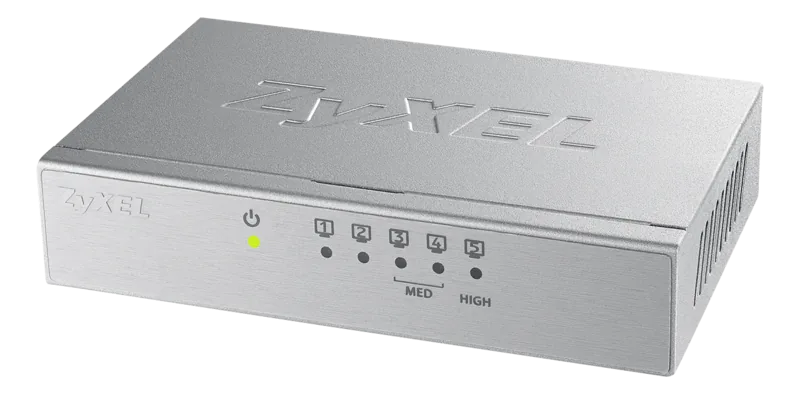
Physically small and desktop-friendly, the ES-10 fits neatly on a desk or shelf. The unit is powered by a supplied 5V DC adapter and shows status via front-panel LEDs: a power indicator and per-port LINK/ACT indicators that reflect connectivity and activity. The switch supports QoS prioritization for bandwidth-sensitive traffic such as VoIP and streaming video, helping ensure smoother performance for real-time services. Built-in flow-control and broadcast storm protection add resilience in congested scenarios.
Performance-wise, the ES-10 offers non-blocking wire-speed forwarding suitable for light to moderate network loads. Its MAC address table and onboard buffer memory help manage traffic efficiently; environmental specs and compliance ratings (FCC Class B, CE, C-Tick) make it suitable for typical office deployments. Installation is straightforward: place the unit in a clean, ventilated area, connect devices with Cat5/Cat5e cables (keeping runs under 100 meters), and plug in the power adapter.
This model emphasizes ease of use and reliability over advanced management features. It’s ideal for users who need a simple, low-cost network expansion solution: small teams, home networks, or isolated groups of devices that require dependable wired connectivity with minimal setup.
Notes
Keep ventilation openings unobstructed and maintain cable runs under 100 meters.
Use the supplied power adapter (5V DC, 0.6A).
QoS ports are recommended for VoIP phones and STBs to prioritize real-time traffic.
LEDs indicate PWR (power) and LINK/ACT (per-port connectivity/activity).




Lukas Wagner
10 mesi fa
I saw reviews saying the included power adapters fail within about a year and that the switch only supports 10/100 Mbps. Is this expected, and what should I do to prevent adapter issues?
Manual.ly
9 mesi fa
L'unita' e' uno switch 10/100 Mbps (Fast Ethernet), quindi non supporta velocita' Gigabit. Per quanto riguarda l'alimentatore: il guasto dell'alimentatore e' il problema piu' segnalato, quindi raccomandiamo di usare l'alimentatore originale (o un equivalente correttamente dimensionato con voltaggio e corrente DC corrispondenti), di posizionare lo switch in un luogo con buona ventilazione e di mantenere la temperatura ambiente entro le specifiche del prodotto (evitare fonti di calore come radiatori o spazi chiusi). Se il vostro alimentatore si guasta, vi preghiamo di contattare il supporto con i dettagli del vostro ordine e una breve descrizione (e foto se possibile). Se e' entro il periodo di garanzia, possiamo organizzare una sostituzione o il rimedio appropriato.