
Zotac ZBOX Magnus EN374070 Manuale
Manuale PDF · 58 Pagine
Italiano



Controllo rapido
Risposta errata, riprova.
Chatta con il manuale del tuo Zotac ZBOX Magnus EN374070 utilizzando l'IA
Ottieni risposte istantanee dall'IA dal manuale del tuo Zotac ZBOX Magnus EN374070
Chiedi qualsiasi cosa sul Zotac ZBOX Magnus EN374070. Le risposte provengono da questo manuale, con le pagine di riferimento.
Fai una Domanda
Consigli ZBOX Magnus EN374070?
Sì NoDomande frequenti
The package includes the ZBOX unit, AC adapter, power cord, warranty card, quick start guide, USB flash drive with Windows drivers, and two WiFi antennas.
Questa risposta è utile?
Place the unit on a flat surface with rubber feet up. Remove thumb screws and slide the cover off. Insert the SO-DIMM module into the slot at a 45 degree angle. Gently press down until it locks into place by the arms of the memory slot.
Questa risposta è utile?
Yes, you can install an M.2 SSD module. Locate the slot and insert the module at a 45 degree angle. Press down gently and secure it with a screw. This allows you to expand your storage capacity for better performance and data retention.
Questa risposta è utile?
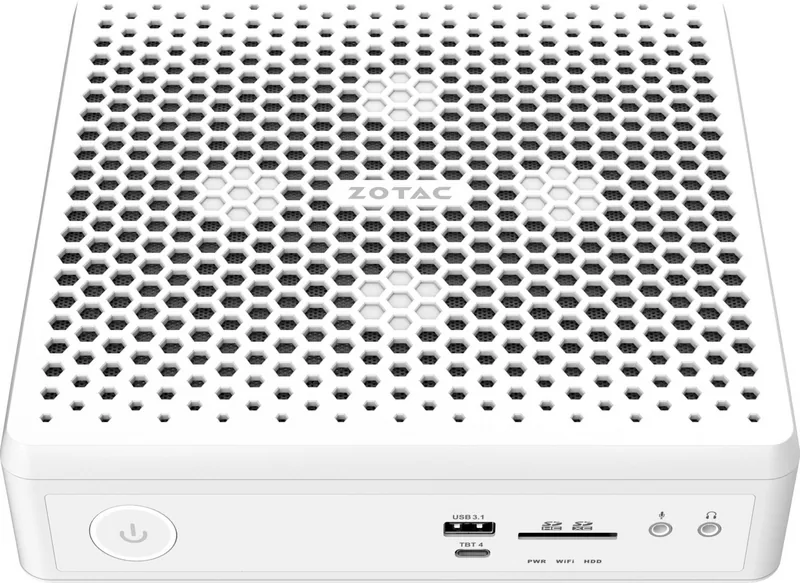
The front panel features a power button, USB 3.1 ports, a Thunderbolt 4 port, a memory card reader supporting UHS-II SDHC/SDXC, power LED, WiFi LED, hard drive LED, microphone jack, and headphone/audio output jack.
Questa risposta è utile?
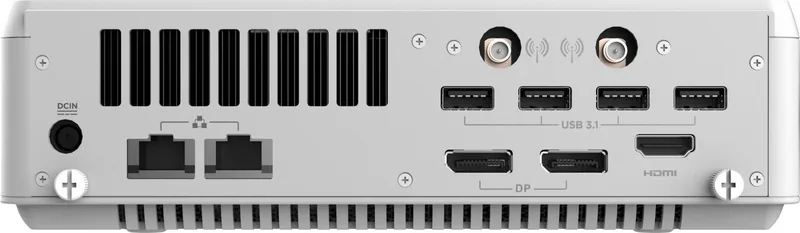
Connect the AC adapter to the power input labeled DC19.5V on the rear panel. Plug the adapter into a standard wall outlet. The rear panel also hosts LAN and USB ports for additional connectivity and network access.
Questa risposta è utile?
While designed for home and office use, it supports external graphics via Thunderbolt 4. It includes multiple display outputs for multitasking. However, it does not contain a dedicated GPU inside the barebone chassis itself.
Questa risposta è utile?
The USB flash drive included in the package contains Windows drivers. You can plug this into a USB port on the unit to access the necessary software for hardware configuration and proper device functionality after installation.
Questa risposta è utile?
Vantaggi e Svantaggi
Vantaggi

- Compact design fits easily on desks.
- User-friendly hardware upgrades for RAM and SSD.
- Comprehensive port selection including Thunderbolt 4.
- USB drivers included for easy setup.
- Supports multiple monitor configurations via DP and HDMI.
Svantaggi

- No pre-installed RAM or storage provided.
- Power cable is not detachable from the unit.
- Requires manual installation of Windows drivers.
- External power supply creates cable clutter.
- Limited storage space without adding M.2 SSD.
Prodotto Specifiche
Tipo
Mini-PC
Zoccolo
Non disponibile
Processore
Intel Core i7-13700HX, 8C+8c/24T, 2,10-5,00GHz, 30MB+14MB Cache, 55-157W TDP (PBP/MTP), Nome in codice "Raptor Lake-HX" (Golden Cove o Raptor Cove + Gracemont, Intel 7)
Memoria
2x DDR5 SO-DIMM, doppio PC5-38400S/DDR5-4800, max. 64GB (UDIMM)
Archiviazione
1x M.2 M-Key (PCIe 4.0 x4, 22110/2280/2242/2230), 1x M.2 M-Key (PCIe 4.0 x4/SATA, 22110/2280/2242/2230)
Slot Esterni
Non disponibile
Slot Interni
Non disponibile
Grafica
NVIDIA GeForce RTX 4070 - 8GB GDDR6 - Mobile, 36SM/4608SP, Nome in codice "AD106" (Ada Lovelace, TSMC 5nm "NVIDIA 4N"), 2175MHz Boost, 115W Potenza Max GPU
Porte Posteriori
1x HDMI 2.1, 2x DisplayPort 1.4a, 4x USB-A 3.1 (10Gb/s), 2x RJ-45 2.5Gb LAN, 1x Jack a barilotto (Alimentazione)
Porte Frontali/Laterali
1x USB-A 3.1 (10Gb/s), 1x Thunderbolt 4 (40Gb/s), 2x Jack 3.5mm, 1x Scheda SD
Slot di Espansione
Non disponibile
Connessione Wireless
Wi-Fi 6 (WLAN 802.11a/b/g/n/ac/ax, 2x2, Intel Killer AX1650), Bluetooth 5.2
Lettore di Schede
Scheda SD
Adattatore di Alimentazione
Esterno, 1x Spina a barilotto (330W/19,5V)
Fissaggio VESA
Non disponibile
Dimensioni (LxAxP)
21,01x6,22x20,29 cm
Volume
2.700,01 cm³
Dissipatore CPU
Incluso
Caratteristiche
Blocco di sicurezza (Kensington)
Garanzia del Produttore
5 anni con garanzia estesa (in caso di registrazione entro 28 giorni dall'acquisto)
Nome USB
Link
Descrizione del prodotto Descrizione
Discover the Power of Compact Computing with Zotac ZBOX Magnus EN374070
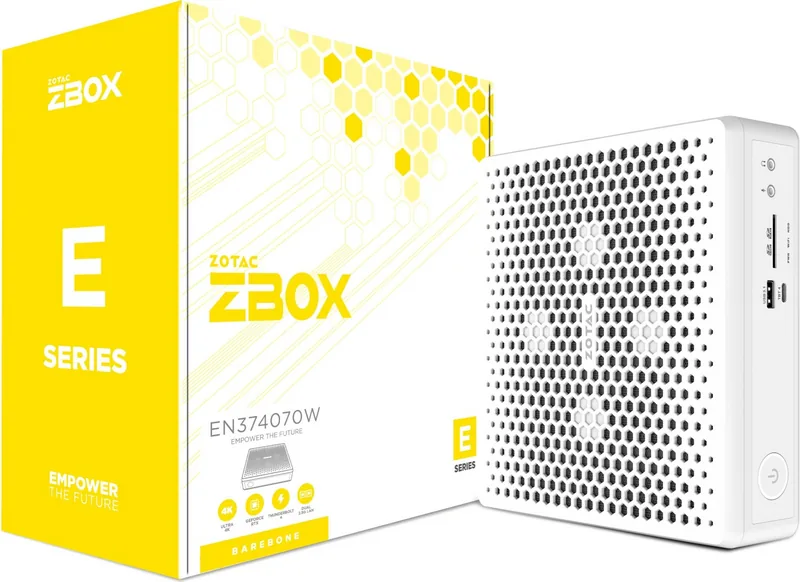
The Zotac ZBOX Magnus EN374070 (Barebone) Manual provides detailed instructions for enthusiasts seeking powerful performance in a small form factor. This mini PC delivers exceptional versatility for home entertainment, productivity tasks, and even light gaming. Its compact design fits seamlessly into any workspace without demanding extensive desk real estate, making it an ideal choice for modern setups that value space efficiency.
Unboxing and Setup Experience
When you open the box, you will find everything needed to get started effectively. The package includes the main ZBOX unit, an AC power adapter, and a sturdy power cord. You also receive a warranty card and a USB flash drive loaded with Windows drivers to simplify your initial software setup significantly. Two WiFi antennas are included to ensure stable network connectivity right out of the box for wireless applications.
Customizing Your Hardware
One of the standout features of this device is its user-friendly upgrade path designed for hobbyists. Opening the chassis is straightforward and designed to be stress-free. Simply place the unit on a flat surface with the rubber feet facing upwards for protection. Locate the two thumb screws and remove them carefully. Slide the cover off in the direction of the arrow to reveal the internals for modification.
Installing memory is intuitive for any user. Locate the SO-DIMM memory slots and insert your module at a precise 45 degree angle. Gently press down until it locks securely into place. Similarly, adding storage is easy and efficient. Find the M.2 SSD slot and insert your drive at a similar angle. Secure it with the provided screw to ensure stability during heavy operation.
Installation steps are detailed to prevent damage during the process.
Connectivity and Ports
The front panel offers convenient access to essential ports for daily use. You will find a power button, USB 3.1 ports, and a Thunderbolt 4 port for high-speed data transfer and external displays. A memory card reader supports UHS-II SDHC and SDXC cards, perfect for photographers needing quick access to images. Audio options include microphone and headphone jacks for multimedia use and communication.
On the rear, the system connects to power via a DC19.5V input ensuring stable voltage delivery. Network users can utilize the LAN port for wired connections with reliable speed. Additional USB 3.1 ports and DisplayPort outputs allow for multiple monitor setups to boost productivity. You can also connect HDMI displays for visual output flexibility.
Note: Always ensure you have a clear understanding of the hardware configuration before installing new components to avoid any compatibility issues. The included resources provide clear visual aids for these steps to guarantee a safe installation process.
Why Choose This System
This barebone solution allows you to select the RAM and storage that best fits your specific needs and budget. It combines power flexibility with a sleek design that looks professional. Whether for a home office or a media center, this system adapts to your requirements efficiently. Enjoy the freedom of customization without sacrificing performance or build quality in this versatile machine.
Cerca tra 67.732 manuali online


Digita il marchio o il modello