


Synology RackStation Plus Series Manuale
Manuale PDF · 52 Pagine
Italiano



Controllo rapido
Risposta errata, riprova.
Chatta con il manuale del tuo Synology RackStation Plus Series utilizzando l'IA
Ottieni risposte istantanee dall'IA dal manuale del tuo Synology RackStation Plus Series
Chiedi qualsiasi cosa sul Synology RackStation Plus Series. Le risposte provengono da questo manuale, con le pagine di riferimento.
Fai una Domanda
Consigli RackStation Plus Series?
Sì NoManuale video
A 1U Rack Mounted NAS - Synology RS822+ Review
Domande frequenti
Check the POWER and STATUS LED indicators. When the system is ready, the Power LED will be static blue and the Status LED will be static green. Other combinations indicate states like powering on, shutting down, or hibernation.
Questa risposta è utile?
Yes, you can install optional Synology memory modules. However, using non-Synology modules may void your warranty. You must shut down the unit and access the rear cover to install the memory correctly.
Questa risposta è utile?
A continuously blinking orange ALERT LED indicates system errors such as fan failure, overheating, or volume degradation. You should log in to DSM immediately to check detailed error logs and take corrective action.
Questa risposta è utile?
No, removing the expansion cable while the host device is powered on can result in data loss. Always power off both the NAS and the expansion unit before disconnecting cables.
Questa risposta è utile?
Press and hold the RESET button until you hear one beep to restore IP, DNS, and admin password to defaults. Press again after the first beep, then hold until three beeps to return to Not Installed status for DSM reinstallation.
Questa risposta è utile?
Yes, but support for exFAT is not enabled by default. You must purchase and download the exFAT Access package from the Package Center within DSM to enable reading and writing to exFAT drives.
Questa risposta è utile?
Vantaggi e Svantaggi
Vantaggi

- Supports up to 28 drive bays with expansion units for massive scalability
- Redundant power supply units ensure high availability and uptime
- Intuitive DSM operating system simplifies management and monitoring
- PCIe slot allows for flexible network card upgrades and customization
- Comprehensive LED indicators provide real-time system status feedback
Svantaggi

- Non-Synology memory modules are not covered under warranty
- Installation requires careful handling due to heavy chassis weight
- Data loss risk if drives are removed while the host device is powered on
- Default administrative account has no password initially, requiring immediate setup
- Complex rail kit installation may require assistance from another person
Prodotto Specifiche
Disco rigido
Non applicabile
Tipo di USB
Collegamento
Descrizione del prodotto Descrizione
Synology RackStation Plus Series (RS820+ / RS820RP+) - Guida rapida e punti salienti dell'installazione
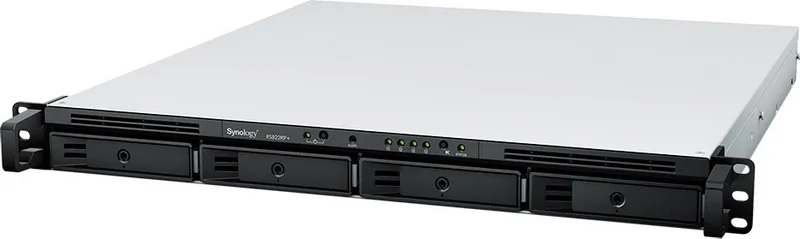
La serie Synology RackStation Plus offre affidabilità di livello enterprise a un NAS compatto a 4 bay pronto per rack, ideale per professionisti domestici, piccoli uffici e team che necessitano di storage centralizzato, espansione rapida e gestione affidabile. I modelli RS820+ e RS820RP+ sono progettati per supportare un'ampia gamma di tipi di drive (SATA da 3.5 pollici e 2.5 pollici) e un ricco set di funzionalità di storage, inclusi Btrfs e più livelli RAID per una protezione flessibile dei dati.
Con una capacità raw massima fino a 56TB (utilizzando quattro drive ad alta capacità), questi sistemi sono costruiti per una crescita scalabile. Le opzioni RAID supportate includono Basic, JBOD, RAID 0, RAID 1, RAID 5, RAID 6, RAID 10 e Synology Hybrid RAID (con tolleranza agli errori fino a 2 dischi). Per i file system, si ottengono Btrfs ed ext4 internamente, più modalità di supporto esterno aggiuntive come NTFS ed exFAT (tramite un pacchetto scaricabile).
L'espansione hardware è una parte importante dell'esperienza. È possibile aggiungere memoria utilizzando moduli RAM Synology compatibili e installare una scheda add-in PCIe per potenziare la rete (ad esempio, 10GbE dual-port) o aggiungere un SSD M.2 NVMe/SATA tramite un adattatore per funzionalità di prestazioni e casi d'uso di caching. Gli indicatori sul pannello frontale semplificano l'operatività quotidiana, con stati chiari per alimentazione, progresso dell'avvio, stato del drive, attività LAN e avvisi come guasti della ventola o condizioni di sovratemperatura.
L'avvio è semplice grazie a Web Assistant, lo strumento di configurazione basato su browser di Synology. Dopo aver acceso e collegato almeno un cavo LAN, è possibile avviare Web Assistant tramite find.synology.com o synologynas:5000 per scaricare e installare DSM. L'installazione iniziale richiede che sia il NAS che il computer si trovino sulla stessa rete locale, e necessita anche di una connessione Internet per recuperare l'ultima versione di DSM.
A livello di pianificazione, il sistema supporta anche pratiche funzionalità del ciclo di vita come l'accensione/spegnimento programmato e Wake on LAN, aiutandoti ad allineare il NAS con i tuoi flussi di lavoro. Per l'installazione fisica, la guida sottolinea la manipolazione sicura, il posizionamento stabile e il corretto montaggio su rack con i kit di guide supportati.
Note
- RS820+ / RS820RP+ non supporta la memoria ECC.
- Sostituire le ventole o i moduli di alimentazione guasti seguendo le corrette procedure di servizio e consultare il supporto Synology per assistenza tecnica.
Caratteristiche principali
- NAS a 4 bay con supporto per drive SATA da 3.5 pollici e 2.5 pollici, raggiungendo fino a 56TB di capacità raw.
- Supporto RAID che spazia da Basic a RAID 6, RAID 10 e Synology Hybrid RAID con tolleranza agli errori fino a 2 dischi.
- Espandi oltre lo storage con uno slot PCIe per networking avanzato o supporto SSD M.2 NVMe/SATA tramite un adattatore.
- Web Assistant consente un'installazione semplificata di DSM, presupponendo l'accesso a Internet e la connettività LAN sulla stessa rete.
- Chiari indicatori di stato LED aiutano a interpretare rapidamente lo stato dei drive, della rete e degli avvisi.
Cerca di 67.706 Manuali online


Digita il marchio o il modello