Manual.ly Logo

Snakebyte Game:Pad 4 S Wireless Manuale

0,0 · 0 Valutazioni

Manuale PDF · 2 Pagine

Italiano

M: GO-GEM-FL-25
pagina

/ 2

Loading...
b60ea7afa6d9fdae92f86f9687bdb3250663 page 1
EN DE
Instruction Manual
Instructions d'utilisation
Bedienungsanleitung
Manuale di istruzioni
Manual
Manual de instrucciones
Instruktionsmanual
GAME PAD 4 S WIRELESS™ for PS4™ / SLIM / PRO
PRODUCT INFORMATION
Thank you for choosing snakebyte’s GAME:PAD 4 S WIRELESS™. Please read this guide for important safety
and health information and retain it for future reference.
CONTENT
1x Controller 1x USB Charging Cable 1x Manual
OPERATING INSTRUCTION GAME:PAD 4 S WIRELESS™ SB909375/SB912726/SB912733/SB912740/SB912757/SB914539
• The GAME:PAD 4 S WIRELESS™ has to be paired with the console to be used.
• Connect GAME:PAD 4 S WIRELESS™-Controller to one of the USB ports on the console with the USB cable
supplied.
• Turn on the console using its Power Button.
• Press the HOME-button to pair the GAME:PAD 4 S WIRELESS™-Controller (the light on the home button
changes from red to blue).
• Follow the screen instruction to choose the user account you would like to play with.
• The GAME:PAD 4 S WIRELESS™-Controller is now set up and ready to use.
• Once the GAME:PAD 4 S WIRELESS™ has been paired with the console, it can also be used to start the
console.
INFORMATION
If you experience functional issues using GAME:PAD 4 S WIRELESS™, please download the latest firmware
installer from www.mysnakebyte.com, then run the installer program and follow the on screen instructions.
TECHNICAL SPECIFICATIONS
• Model number: SB909375/SB912726/SB912733/SB912740/SB912757/SB914539
• Frequency: Bluetooth™
• Input Power: DC 5V / 400mAh
• Output Power: DC 3.7V / 300mAh
• Battery capacity: 500mAh
• Battery type: Li-ion
• Working Range: 8-10m
TROUBLE SHOOTING
THE GAME:PAD 4 S WIRELESS™-CONTROLLER DOES NOT WORK WITH THE CONSOLE:
• make sure the GAME:PAD 4 S WIRELESS™-Controller has been paired with the console (blue home button
light).
• make sure the GAME:PAD 4 S WIRELESS™-Controller is charged.
• make sure the GAME:PAD 4 S WIRELESS™-Controller is with transmission range (roughly 8-10 meters of the
console).
THE GAME:PAD 4 S WIRELESS™-CONTROLLER DOES NOT WORK WITH THE CONSOLE AND THE HOME BUTTON LIGHT
REMAINS OFF:
• charge the GAME:PAD 4 S WIRELESS™-Controller using the USB ports on the console, or a standard USB
adaptor.
GENERAL PRECAUTIONS
• Keep device out of reach of small children.
• Do not expose the product to extremely hot, or cold temperatures, high humidity or direct sunlight.
• Do not use the product close to any heat sources.
• Do not subject the product to any liquids and never use it when the product is wet.
• Do not put heavy objects on the product.
• Do not throw or drop the product.
• Do not attempt to take apart, open, service or modify the product. Doing so could present the risk of
electronic shock, damage, fire, or other hazard.
HEALTH PRECAUTIONS
• If you feel tired, experience any discomfort or pain in your arms, or hands, stop using the product
immediately and consult a doctor, if the conditions persist.
• Avoid prolonged use of this product and take a break about every 30 minutes.
CLEANING
• Clean only with a soft, dry cloth. Avoid cleaning solutions, solvents or other chemicals and do not attempt to
clean connectors as this may damage the product.
GAME PAD 4 S WIRELESS™ für PS4™ / SLIM / PRO
PRODUKTINFORMATION
Vielen Dank, dass Sie sich für snakebyte's GAME:PAD 4 S WIRELESS™ entschieden haben. Bitte lesen Sie die
folgenden Sicherheitshinweise aufmerksam durch und bewahren Sie die Anleitung auf.
INHALT
1x Controller 1x USB Ladekabel 1x Handbuch
BEDIENUNGSANLEITUNG GAME:PAD 4 S WIRELESS™ SB909375/SB912726/SB912733/SB912740/SB912757/SB914539
• Das GAME:PAD 4 S WIRELESS™ muss vor dem Gebrauch mit der Konsole „gepaired“ werden
• Schließen Sie dazu das GAME:PAD 4 S WIRELESS™ mittels des mitgelieferten USB-Kabels an einen der
USB-Anschlüsse der Konsole an.
• Betätigen Sie den EInschaltknopf der Konsole
• Drücken Sie den Home-Button um das GAME:PAD 4 S WIRELESS™ zu „pairen“.
• Folgen Sie den Instruktionen auf dem Bildschirm um das Spielerkonto auszuwählen, mit dem Sie spielen
möchten.
• Der GAME:PAD 4 S WIRELESS™-Controller ist nun eingerichtet und betriebsbereit.
• Sobald das GAME:PAD 4 S WIRELESS™ mit der Konsole „gepaired“ ist, können Sie diese auch mittels des
Home-Buttons auf dem Controller einschalten.
HINWEIS
Falls es zu Funktionsstörungen während des Betriebs kommen sollte, laden Sie bitte die aktuellste
Firmware-Installer des GAME:PAD 4 S WIRELESS™ auf www.mysnakebyte.com herunter. Starten Sie dann das
Programm und folgen Sie den Anweisungen auf dem Bildschirm.
TECHNISCHE DATEN
• Modellnummer: SB909375/SB912726/SB912733/SB912740/SB912757/SB914539
• Frequenz: Bluetooth™
• Eingangsspannung: DC 5V / 400mAh
• Ausgangsspannung: DC 3.7V / 300mAh
• Batteriekapazität: 500mAh
• Batterietyp: Li-ion
• Reichweite: 8-10m
FEHLERBEHEBUNG
DAS GAME:PAD 4 S WIRELESS™ FUNKTIONIERT NICHT MIT DER KONSOLE:
• stellen Sie sicher, dass der Controller ordnungsgemäß mit der Konsole „gepaired“wurde (der Home-Button
leuchtet blau).
• stellen Sie sicher, dass der Controller aufgeladen ist.
• stellen Sie sicher, dass sich der Controller innerhalb des Übertragungsradius der Konsole befindet.
DAS GAME:PAD 4 S WIRELESS™ FUNKTIONIERT NICHT UND DER HOME-BUTTON BLEIBT UNBELEUCHTET:
• laden Sie den Controller an einem der USB-Anschlüsse der Konsole, oder mittels eines handelsüblichen
USB-Ladegeräts auf.
ALLGEMEINE VORSICHTSMASSNAHMEN
• Bewahren Sie das Gerät außer Reichweite von kleinen Kindern auf.
• Setzen Sie das Produkt nicht sehr hohen oder kalten Temperaturen, hoher Luftfeuchtigkeit, oder direktem
Sonnenlicht aus.
• Verwenden Sie das Produkt nicht in der Nähe von Wärmequellen.
• Schützen Sie das Produkt vor Flüssigkeiten und benutzen Sie es niemals, wenn es feucht ist.
• Stellen Sie keine schweren Objekte auf dieses Produkt.
• Werfen Sie das Produkt nicht und lassen Sie es nicht fallen.
• Versuchen Sie nicht das Produkt selbst zu öffnen, auseinanderzunehmen oder zu ändern. Dies kann zu
Stromschlag, Beschädigung des Produkts, Feuer oder anderen Gefahren führen.
GESUNDHEITSHINWEISE
Wenn Sie sich müde, oder unwohl fühlen, oder Schmerzen in Armen, oder Händen spüren, unterbrechen Sie
sofort die Nutzung des Produkts. Falls die Beschwerden anhalten, konsultieren Sie bitte einen Arzt.
Vermeiden Sie eine übermässig lange Verwendung des Produkts und legen Sie alle 30 Minuten eine Pause ein.
REINIGUNG
• Reinigen Sie das Produkt nur mit einem weichen, trockenen Tuch. Vermeiden Sie die Verwendung von
Reinigungslösungen und Chemikalien und versuchen Sie nicht, die Kontaktstecker zu reinigen, da dies in
Beschädigungen des Produkts resultieren kann.
GAME PAD 4 S WIRELESS™ pour PS4™ / SLIM / PRO
INFORMATIONS PRODUIT
Merci d’avoir acheté la GAME:PAD 4 S WIRELESS™. Veuillez lire ce guide pour des informations importantes
relatives à la sécurité et à la santé, et le conserver pour référence ultérieure.
CONTENU
1x Controller 1x Câble de charge USB 1x Instructions d'utilisation
UTILISATION LE GAME:PAD 4 S WIRELESS™ SB909375/SB912726/SB912733/SB912740/SB912757/SB914539
• La manette GAME:PAD 4 S WIRELESS™ doit être couplée avec la console pour pouvoir être utilisée.
• Connectez la manette GAME:PAD 4 S WIRELESS™ à l'un des ports USB de la console avec le câble USB
fourni.
• Allumez la console à l'aide de son bouton d'alimentation.
• Appuyez sur le bouton Accueil pour coupler la manette GAME:PAD 4 S WIRELESS™ (le voyant du bouton
Accueil passe du rouge au bleu).
• Suivez les instructions qui s'affichent à l'écran pour choisir le compte utilisateur avec lequel vous souhaitez
jouer.
• La manette GAME:PAD 4 S WIRELESS™ est maintenant configurée et prête à être utilisée.
• Une fois que la manette GAME:PAD 4 S WIRELESS™ a été couplée avec la console, elle peut aussi être
utilisée pour allumer la console.
INFORMATION
Si vous recontrez des problèmes fonctionnels en utilisant GAME:PAD 4 S WIRELESS™, veuillez télécharger
l'installateur de formware le plus recent depuis www.mysnakebyte.com, puis exécutez le programme de
l'installateur et suivez instructions qui apparaissent sur l'écran.
SPÉCIFICATIONS TECHNIQUES
• Numéro de modèle: SB909375/SB912726/SB912733/SB912740/SB912757/SB914539
• Fréquence: Bluetooth™
• Input Power: DC 5V / 400mAh
• Output Power: DC 3.7V / 300mAh
• Capacité de la batterie: 500mAh
• Type de batterie: Li-ion
• Portée: 8-10m
RÉSOLUTION DE PROBLÈMES
LA MANETTE GAME:PAD 4 S WIRELESS™ NE MARCHE PAS AVEC LA CONSOLE:
• assurez-vous que la manette GAME:PAD 4 S WIRELESS™ a bien été couplée avec la console (le voyant
du bouton Accueil est bleu).
• assurez-vous que la manette GAME:PAD 4 S WIRELESS™ est chargée.
• assurez-vous que la manette GAME:PAD 4 S WIRELESS™ est à portée d'émission (à environ 8-10 mètres de
la console).
LA MANETTE GAME:PAD 4 S WIRELESS™ NE MARCHE PAS AVEC LA CONSOLE ET LE VOYANT DU BOUTON
ACCUEIL RESTE ÉTEINT:
• rechargez la manette GAME:PAD 4 S WIRELESS™ sur un des ports USB de la console ou avec un
adaptateur USB standard.
PRÉCAUTIONS GÉNÉRALES
• Gardez l'appareil hors de portée des petits enfants.
• Ne pas exposer le produit à des températures extrêmement chaudes ou froides, à une forte humidité ou
à une lumière directe du soleil.
• Ne pas utiliser le produit près de quelconque source de chaleur.
• Ne pas soumettre le produit dans n'importe quel liquide et ne jamais l'utiliser lorsque le produit est mouillé.
• Ne pas mettre d'objets lourds sur le produit.
• Ne pas lancer ni laisser tomber le produit.
• Ne pas tenter de démonter, d'ouvrir, de servir ou de modifier le produit. Cela pourrait présenter le risque
d’un choc électronique, de dommages, d'incendie ou d'autres dangers.
PRÉCAUTIONS RELATIVES À LA SANTÉ
• Si vous vous sentez fatigué, ressentez une gêne ou une douleur dans vos bras ou vos mains, cessez
immédiatement d’utiliser le produit et, si le problème persiste, consultez un médecin.
• Évitez l’utilisation prolongée du produit et faites une pause toutes les 30 minutes environ.
NETTOYAGE
• Nettoyez seulement avec un chiffon doux et sec. Évitez les solutions de nettoyage, les solvants ou
d'autres produits chimiques et ne tentez pas de nettoyer les connecteurs car cela pourrait endommager le
produit.
GAME:PAD 4 S WIRELESS
™
FR
CUSTOMER SUPPORT / TECHNICAL SUPPORT
snakebyte distribution GmbH
Konrad-Zuse-Strasse 13
58239 Schwerte / Germany
Website: www.mysnakebyte.com
SUPPORT CLIENT / SUPPORT TECHNIQUE
snakebyte distribution GmbH
Konrad-Zuse-Strasse 13
58239 Schwerte / Germany
Website: www.mysnakebyte.com
KUNDENSUPPORT / TECHNISCHER SUPPORT
snakebyte distribution GmbH
Konrad-Zuse-Strasse 13
58239 Schwerte / Deutschland
Telefon: +49 (0) 0800-4022300
Webseite: www.mysnakebyte.com
1
2
3
4
5
6 7 8 910
EN
PT
DE
1. Digitales Steuerkreuz
2. Linker Analog Stick
3. Aktionstasten
4. Rechter Analog Stick
5. HOME-Taste
6. L1/L2-Tasten
7. SHARE-Taste
8. OPTIONS-Taste
9. R1/R2-Tasten
10. Touchpad
11. 3.5mm Klinkenstecker
1. Directional Pad
2. Left Analog stick
3. Action Buttons
4. Right Analog Stick
5. HOME Button
6. L1/L2 Buttons
7. SHARE Button
8. OPTIONS Button
9. R1/R2 Buttons
10. Touch sensitive pad
11. 3.5mm jack
ES
1. Pad direccional
2. Stick analógico izquierdo
3. Botones de acción
4. Stick analógico derecho
5. Botón INICIO
6. Botones L1/L2
7. Botón COMPARTIR
8. Botón OPCIONES
9. Botones R1/R2
10. Pad sensible al tacto
11. 3.5mm jack
1. Botão Direcional
2. Alavanca Analógica Esquerda
3. Botões de Ação
4. Alavanca Analógica Direita
5. Botão HOME
6. Botões L1/L2
7. Botão COMPARTILHAR
8. Botão OPÇÕES
9. Botões R1/R2
10. Touchpad
11. 3.5mm jack
FR
1. Pavé directionnel
2. Stick analogue gauche
3. Boutons d'action
4. Stick analogue droit
5. Bouton Accueil
6. Boutons L1/L2
7. Bouton Partage
8. Bouton Options
9. Boutons R1/R2
10. Pavé tactile
11. 3.5mm jack
IT
1. Pad direzionale
2. Levetta analogica sinistra
3. Pulsanti di azione
4. Levetta analogica destra
5. Pulsante HOME
6. Pulsanti L1/L2
7. Pulsante CONDIVIDI
8. Pulsante OPZIONI
9. Pulsanti R1/R2
10. Pad sensibile al tocco
11. 3.5mm jack
11

Chatta con il manuale del tuo Snakebyte Game:Pad 4 S Wireless utilizzando l'IA

Ottieni risposte istantanee dall'IA dal manuale del tuo Snakebyte Game:Pad 4 S Wireless

Chiedi qualsiasi cosa sul Snakebyte Game:Pad 4 S Wireless. Le risposte provengono da questo manuale, con le pagine di riferimento.

Fai una Domanda

0/1000

Consigli Game:Pad 4 S Wireless?

Sì No

Domande frequenti

A

È progettato per i sistemi PS4, PS4 Slim e PS4 Pro. Il controller deve essere associato alla console prima di iniziare il gioco wireless, ma una volta connesso può essere utilizzato normalmente e persino per accendere la console.

Questa risposta è utile?

A

Collega il controller alla console usando il cavo USB incluso, accendi la console, quindi premi il pulsante HOME. Quando la luce HOME cambia da rosso a blu, l'associazione è completa e il controller è pronto all'uso.

Questa risposta è utile?

A

La luce blu HOME indica che il controller è stato associato con successo alla console. Se la luce resta spenta o non diventa blu, potrebbe essere necessario ricaricare il controller o ripetere l'associazione.

Questa risposta è utile?

A

Per prima cosa, verifica che il controller sia associato, carico e entro la portata. Se i problemi continuano, prova a ricaricarlo tramite la console o un adattatore USB. Per problemi persistenti, installa il firmware più recente dal supporto Snakebyte.

Questa risposta è utile?

A

La portata consigliata è di circa 8-10 metri. Pareti, interferenze o batteria scarica possono ridurre questa distanza, quindi le prestazioni sono migliori quando il controller viene usato vicino alla console.

Questa risposta è utile?

A

Usa solo un panno morbido e asciutto per la pulizia. Tienilo lontano da liquidi, temperature estreme, umidità e luce solare diretta. Evita detergenti aggressivi e non provare mai ad aprire o modificare il dispositivo.

Questa risposta è utile?

M: GO-GEM-FL-25

Vantaggi e Svantaggi

Vantaggi

  • La connessione wireless Bluetooth mantiene il gioco flessibile e riduce l'ingombro dei cavi.
  • Il semplice processo di associazione rende la configurazione facile una volta collegato tramite USB e HOME.
  • Compatibile con PS4, PS4 Slim e PS4 Pro per un ampio supporto alle console.
  • Include controlli utili come touchpad, SHARE, OPTIONS e jack da 3,5 mm.
VS

Svantaggi

  • La configurazione iniziale richiede un passaggio di associazione USB cablato prima dell'uso wireless.
  • La portata wireless è limitata a circa 8-10 metri.
  • La capacità della batteria è modesta, quindi potrebbe essere necessaria la ricarica dopo sessioni più lunghe.
  • Alcuni problemi potrebbero richiedere un aggiornamento firmware da parte del produttore.
M: GO-GEM-FL-25

Prodotto Specifiche

Tipo

Gamepad

Compatibilita

PS4

Connettivita

senza fili (Bluetooth)

Alimentazione

USB

Pulsanti

14 (totali), 4 (pulsanti funzione), 4 (pulsanti azione), 2 (grilletti), 2 (pulsanti dorsali), 2 (stick analogici)

Stick Analogici

1 concavo (a sinistra sotto il D-pad), 1 concavo (a destra sotto i pulsanti azione)

D-pad

concavo

Funzionalita Speciali

jack da 3,5 mm, 2 motori di vibrazione, sensore di movimento, Touchpad

M: GO-GEM-FL-25

Descrizione del prodotto Descrizione

Manuale del Controller Wireless Snakebyte Game:Pad 4 S: un compagno pratico per il gaming senza fili

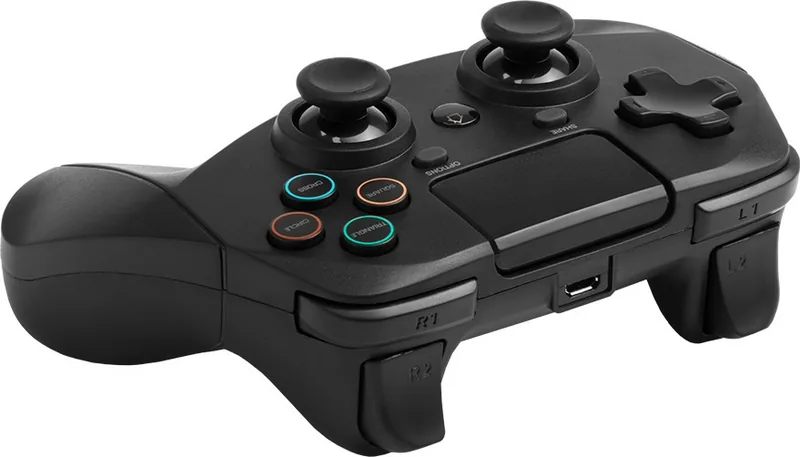
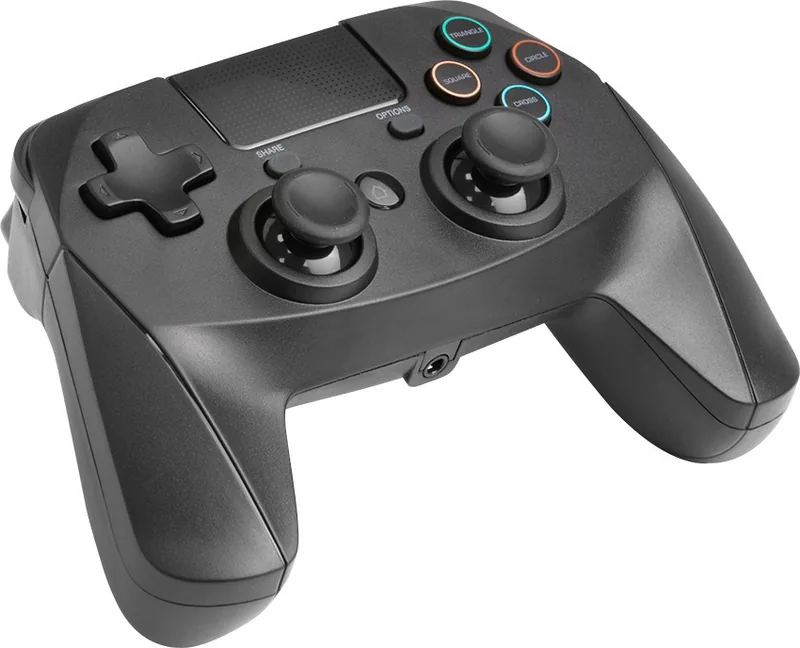
Il Controller Wireless Snakebyte Game:Pad 4 S è pensato per i giocatori che desiderano un modo semplice e senza fili per godersi i giochi su PS4, PS4 Slim e PS4 Pro. Questo controller punta su una configurazione immediata, una connessione Bluetooth affidabile e comandi familiari in stile PlayStation, rendendolo una scelta interessante per il gioco quotidiano. Per chi cerca il Manuale del Controller Wireless Snakebyte Game:Pad 4 S, il concetto chiave è chiaro: questo controller è progettato per farti entrare nel gioco rapidamente, una volta associato correttamente.

Configurazione facile e uso quotidiano

L'associazione inizia con una connessione USB alla console, seguita dalla pressione del pulsante HOME finché la luce cambia da rosso a blu. Questo cambio di colore conferma la connessione e segnala che il controller è pronto all'uso. Dopo la configurazione, il controller può persino essere usato per accendere la console, aggiungendo un ulteriore livello di praticità per le sessioni di gioco abituali. La confezione include anche un cavo di ricarica USB, quindi l'essenziale è coperto fin dall'inizio.

Funzioni che contano

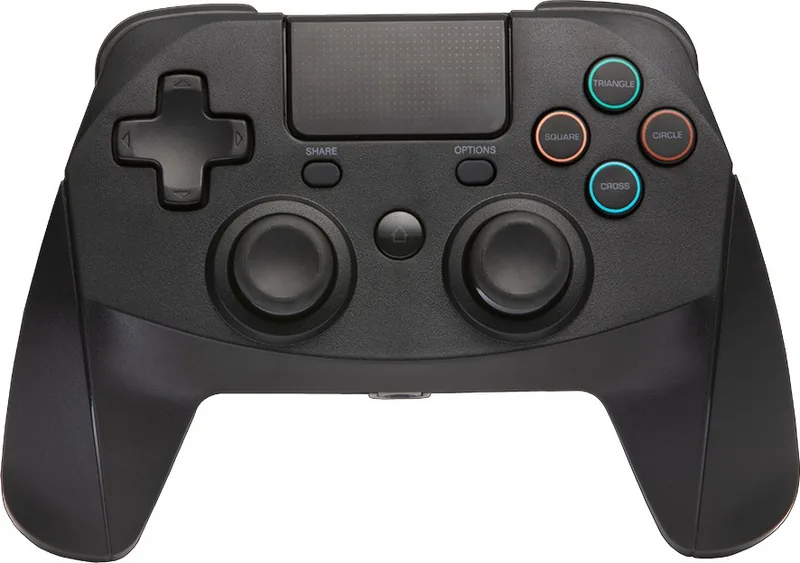
Il controller utilizza la comunicazione wireless Bluetooth e offre un raggio operativo di circa 8-10 metri, più che sufficiente per il tipico gaming in soggiorno. Include il set standard di controlli previsto da un moderno gamepad: croce direzionale, stick analogici, pulsanti azione, pulsanti dorsali, SHARE, OPTIONS e touchpad. Un jack da 3,5 mm aggiunge un ulteriore tocco pratico per l'uso con cuffie con microfono. Internamente funziona con una batteria agli ioni di litio da 500 mAh, supportata da un ingresso di ricarica USB da 5V.

Suggerimenti utili per prestazioni migliori

Se il controller non risponde correttamente, le soluzioni più comuni sono anche le più semplici: controlla che l'associazione sia avvenuta, verifica che la batteria sia carica e mantieniti entro la portata. In alcuni casi, scaricare il firmware più recente dal sito di supporto di Snakebyte può risolvere i problemi di funzionamento. Come molti accessori wireless, questo controller funziona al meglio se mantenuto aggiornato e carico.

Note

  • Conservalo lontano da calore, umidità e luce solare diretta.
  • Evita i liquidi e non usarlo mai quando è bagnato.
  • Pulisci solo con un panno morbido e asciutto.
  • Fai delle pause durante le sessioni lunghe per ridurre l'affaticamento delle mani.

Nel complesso, il Controller Wireless Snakebyte Game:Pad 4 S offre un equilibrio tra praticità, comandi familiari e un design pensato per l'assistenza, rendendolo una scelta solida per il gaming PS4 occasionale e regolare.

M: GO-GEM-FL-25

© Copyright 2026 Manual.ly