Manual.ly Logo

Rapoo V500PRO Manuale

0,0 · 0 Valutazioni

Manuale PDF · 2 Pagine

Italiano

M: QW-35-FL
pagina

/ 2

Loading...
db203f740bf000852059a0a8a6e3c8b5efc8 page 2
Package contents / Contenu de l’emballage / Packungsinhalt / Contenuto della confezione / Contenidos del Embalaje /
Inhoud van de verpakking / Conteúdos da embalagem / Комплект поставки / Вміст пакунку
Fn+F1 = Режим брижів
Fn+F2 = Статичний режим
Fn+F3 = Реактивний режим
Fn+F4 = Режим пульсації
Fn+F5 = Режим зоряного світла
Fn+F6 = Режим Рулетка
Fn+F7 = Режим кривої
Fn+F8 = Режим північного сяйва
Fn+F9 = Режим Феєрверк
Fn+F10 = Режим Дощові краплі
Fn+F11 = Ігровий режим FPS
Fn+F12 = Ігровий режим MOBA
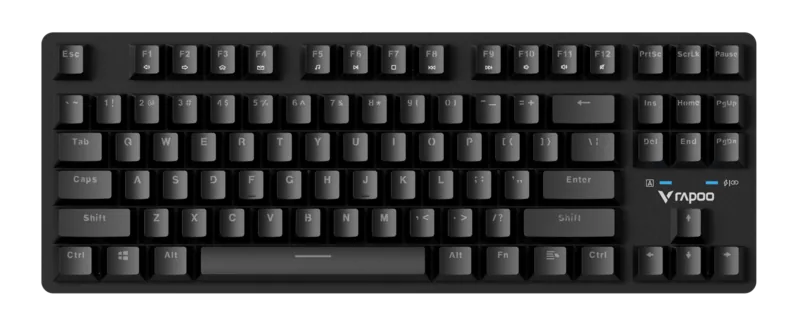
Fn+Win = WinLock
Fn+→ = Частота+
Fn+← = Частота-
Fn+↑ = Яскравість+
Fn+↓ = Яскравість-
Fn = Підсвічення Fn і клавіші комбінацій
I always press the Windows key while gaming.
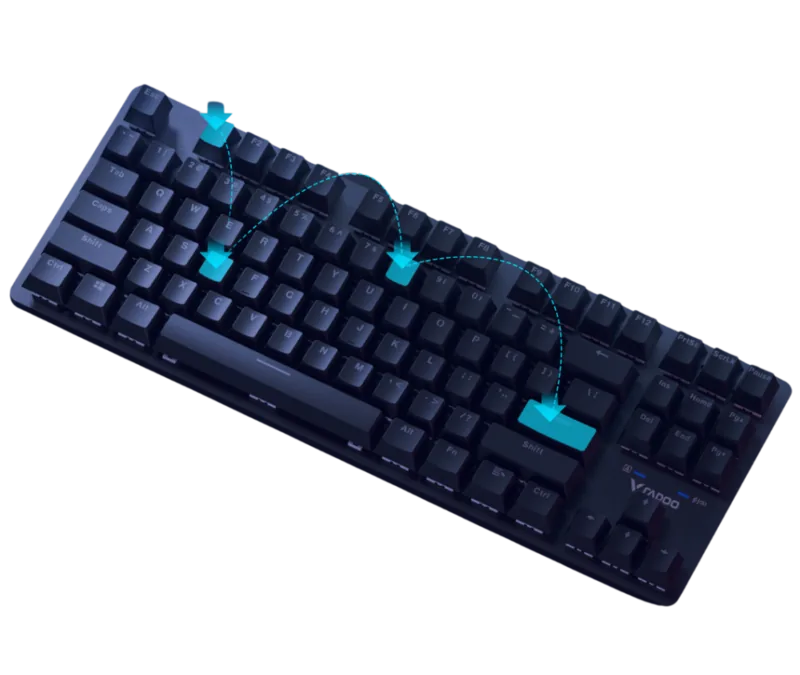
Press Fn and Windows key simultaneously to lock the Windows key and prevent accidental activations.
J'appuie toujours sur la touche Windows quand je joue.
Appuyez simultanément sur la touche FN et Windows pour verrouiller la touche Windows et empêcher les activations accidentelles.
Ich komme beim Spielen ständig auf die Windows-Taste.
Drücken Sie zum Sperren der Windows-Taste gleichzeitig Fn- und Windows-Taste.
Premo sempre il tasto Windows durante il gioco.
Premere contemporaneamente i tasti FN e Windows per bloccare il tasto Windows ed evitare attivazioni accidentali.
Siempre presiono la tecla Windows durante el juego.
Presione las teclas FN y Windows simultáneamente para bloquear la tecla Windows y evitar activaciones accidentales.
Ik druk altijd op de Windows-toets tijdens het spelen van spelletjes.
Druk de FN- en Windows-toets samen in om de Windows-toets te vergrendelen en per ongeluk activeren te voorkomen.
Pressiono sempre a tecla Windows enquanto estou a jogar.
Pressione as teclas FN e Windows em simultâneo para bloquear a tecla Windows e impedir ativações acidentais.
Во время игры я всегда нажимаю на клавишу Windows.
Нажмите FN и клавишу Windows одновременно для блокировки клавиши Windows и защиты от случайных срабатываний.
Я завжди натискаю клавішу Windows під час гри.
Натисніть клавіші FN і Windows одночасно, щоб заблокувати клавішу Windows і запобігти випадковому задіянню клавіші.
System Requirements / Exigences du système / Systemvoraussetzungen / Requisiti di sistema /
Requerimientos del sistema / Systeemvereisten / Requisitos do Sistema /
Системные требования / Системні вимоги
Windows
®
XP / Vista / 7 / 8 / 10 or later, USB port
Windows
®
XP / Vista / 7 / 8 / 10 ou version ultérieure, Port USB
Windows
®
XP / Vista / 7 / 8 / 10 oder höher, USB-Anschluss
Windows
®
XP / Vista / 7 / 8 / 10 o versioni successive, Porta USB
Windows
®
XP / Vista / 7 / 8 / 10 o posterior, Puerto USB
Windows
®
XP / Vista / 7 / 8 / 10 of later, USB-poort
Windows
®
XP / Vista / 7 / 8 / 10 ou mais recente, porta USB
Windows
®
XP / Vista / 7 / 8 / 10 или более поздней версии, USB порт
Windows
®
XP / Vista / 7 / 8 / 10 або вище, порт USB
5602-06K13-222
www.rapoo.com
V500PRO
Backlit Mechanical Gaming Keyboard
Trouble shooting / Dépannage /Problemlösung / Risoluzione dei problemi / Solucionar problemas
Problemen oplossen / Resolução de problemas / Устранение неполадок / Усунення несправностей
It is forbidden to reproduce any part of this quick start guide without the permission of Shenzhen Rapoo Technology Co., Ltd.
FCC Statement
This equipment has been tested and found to comply with the limits for a Class B digital device, pursuant to part 15 of the FCC rules. These limits are designed to provide reasonable
protection against harmful interference in a residential installation. This equipment generates, uses and can radiate radio frequency energy and, if not installed and used in
accordance with the instructions, may cause harmful interference to radio communications. However, there is no guarantee that interference will not occur in a particular
installation. If this equipment does cause harmful interference
to radio or television reception, which can be determined by turning the equipment off and on, the user is encouraged to try to correct the interference by one or more of the
following measures:
-Reorient or relocate the receiving antenna.
-Increase the separation between the equipment and receiver.
-Connect the equipment into an outlet on a circuit different from that to which the receiver is connected.
-Consult the dealer or an experienced radio/TV technician for help.
To assure continued compliance, any changes or modifications not expressly approved by the party responsible for compliance could void the user’s authority to operate this
equipment. (Example- use only shielded
interface cables when connecting to computer or peripheral devices).
FCC Radiation Exposure Statement
This equipment complies with FCC RF radiation exposure limits set forth for an uncontrolled environment. This transmitter must not be co-located or operating in conjunction
with any other antenna or transmitter.
This equipment complies with Part 15 of the FCC Rules.Operation is subject to the following two conditions:
(1) This device may not cause harmful interference, and
(2) This device must accept any interference received, including interference that may cause undesired operation.
Caution!
The manufacturer is not responsible for any radio or TV interference caused by unauthorized modifications to this equipment. Such modifications could void the user authority
to operate the equipment.
ISEDC RSS warning
This device complies with Industry Canada licence-exempt RSS standard (s). Operation is subject to the following two conditions:
(1) this device may not cause interference, and
(2) this device must accept any interference,including interference that may cause undesired operation of the device.
Le présent appareil est conforme aux CNR d'Industrie Canada applicables aux appareils radio exempts de licence.
L'exploitation est autorisée aux deux conditions suivantes:
(1) l'appareil ne doit pas produire de brouillage, et
(2) l'utilisateur de l'appareil doit accepter tout brouillage radioélectrique subi, même si le brouillage est susceptible d'en compromettre le fonctionnement.
ISEDC Radiation Exposure Statement:
This equipment complies with ISEDC RF radiation exposure limits set forth for an uncontrolled environment. This transmitter must not be co-located or operating in
conjunction with any other antenna or transmitter.
Cet appareil est conforme aux limitesd'exposition de rayonnement RF ISEDC établiespour un environnement non contrôlé.
Cetémetteur ne doit pas être co-implanté oufonctionner en conjonction avec toute autreantenne ou transmetteur.
Any Changes or modifications not expressly approved by the party responsible for compliance could void the user’s authority to operate the equipment.

Chatta con il manuale del tuo Rapoo V500PRO utilizzando l'IA

Ottieni risposte istantanee dall'IA dal manuale del tuo Rapoo V500PRO

Chiedi qualsiasi cosa sul Rapoo V500PRO. Le risposte provengono da questo manuale, con le pagine di riferimento.

Fai una Domanda

0/1000

Consigli V500PRO?

Sì No

Domande frequenti

A

Appuyez sur la touche Fn et la touche Windows simultanément pour verrouiller la touche Windows. Appuyez à nouveau pour déverrouiller.

Questa risposta è utile?

A

Il y a douze modes incluant Ripple, Statique, Réactif, Respirant, Starlight, Roulette, Courbe, Aurora, Firework, Raindrop, Jeu FPS, et Jeu MOBA.

Questa risposta è utile?

A

Ce clavier est principalement conçu pour Windows XP et versions ultérieures. Bien qu'il puisse fonctionner physiquement sur Mac, la prise en charge complète de la mappage des touches n'est pas garantie.

Questa risposta è utile?

A

Oui, utilisez la touche Fn combinée avec la flèche Haut pour augmenter la luminosité et la flèche Bas pour la diminuer.

Questa risposta è utile?

A

Il utilise des commutateurs mécaniques BLUE qui offrent un coup tactile et un son de clic audible pour chaque frappe.

Questa risposta è utile?

M: QW-35-FL

Vantaggi e Svantaggi

Vantaggi

  • Douze modes lumineux divers permettent une personnalisation profonde de l'apparence du clavier
  • Les commutateurs BLUE fournissent une excellente rétroaction tactile et un clic audible pour une entrée précise
  • La fonction Win Lock empêche efficacement l'activation accidentelle de la touche Windows pendant le jeu
  • Une large compatibilité prend en charge Windows XP jusqu'à Windows 10 et versions plus récentes de manière transparente
VS

Svantaggi

  • Aucune touche média dédiée n'est incluse pour des réglages rapides de volume ou de lecture de pistes
  • Les effets lumineux ne peuvent pas être personnalisés individuellement par touche sans logiciel supplémentaire
  • Un câble non détachable peut limiter la portabilité pour les utilisateurs qui voyagent souvent
M: QW-35-FL

Prodotto Specifiche

Layout

Regno Unito

Tipo

meccanico

Illuminazione

RGB

Livello Tasti

elevati, senza cornice

Formato Tasti

standard

Cupola Tasto

concava

Tastierino Numerico

Standard

Blocco Freccie

Standard

Tasti di Controllo

Standard

Tasto Invio

accorciato

Tasto Cancellazione

Standard

Indicatore Stato

Bloc Maius, Bloc Num, Scroll Lock

Poggiapolsi

N/A

Scocca

Metallo

Colore Scocca

solido, nero

Finitura Tasti

solido, nero

Inscrizione Tasti

solido, bianco (traslucido)

Connessione

cablato (1,50 m), USB-A 2.0

Alimentazione

USB

Dimensioni (LxPxH)

43,41x3,61x13,11 cm

Peso

0,81 kg

Caratteristiche

Anti-ghosting (rollover N-tasti), resistente agli schizzi, tasto FN

M: QW-35-FL

Descrizione del prodotto Descrizione

Eleve Votre Jeu Avec le Rapoo V500PRO

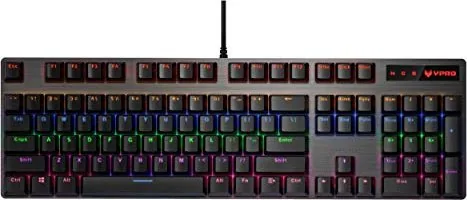
Le Rapoo V500PRO est un clavier de jeu mécanique rétroéclairé conçu pour les passionnés qui exigent précision et style. Doté de commutateurs BLUE durables, ce clavier offre un clic tactile satisfaisant et une rétroaction audible qui améliore la vitesse et la précision de frappe lors de sessions de jeu intenses ou de longues heures de travail. Le disposition UK garantit un emplacement familier des touches pour les utilisateurs britanniques tout en offrant une esthétique élégante qui s'intègre à n'importe quel setup de bureau moderne.

L'une des caractéristiques phares du V500PRO est sa personnalisation lumineuse étendue. Les utilisateurs peuvent basculer entre douze effets lumineux distincts en utilisant des combinaisons simples de touches Fn. Du mode Pulse doux à l'effet dynamique Firework, chaque paramètre transforme le clavier en élément central visuel. Les modes Ripple, Starlight et Aurora offrent un éclairage d'ambiance subtil, tandis que les modes de jeu FPS et MOBA proposent des motifs spécifiques adaptés au jeu compétitif.

Pour les joueurs qui utilisent fréquemment la touche Windows, le V500PRO inclut une fonction dédiée Win Lock. En appuyant simultanément sur les touches Fn et Windows, vous pouvez désactiver la touche Windows pour prévenir les interruptions accidentelles lors de moments critiques dans un jeu. Cette petite mais cruciale addition assure que votre concentration reste sur l'action sans pop-ups indésirables.

Le clavier est compatible plug-and-play avec Windows XP jusqu'à Windows 10 et versions ultérieures via un port USB standard. Sa construction robuste et son design ergonomique le rendent adapté aussi bien aux athlètes professionnels d'esport qu'aux utilisateurs domestiques occasionnels. Que vous soyez en bataille dans un MOBA ou en train de taper des documents, le Rapoo V500PRO offre fiabilité et performance.

Points Clés

  • Douze modes lumineux uniques incluant des effets réactifs et respirants.
  • Commutateurs mécaniques BLUE durables pour une rétroaction tactile.
  • Intégration de Win Lock pour prévenir les pressions de touches accidentelles.
  • Compatible avec tous les principaux systèmes d'exploitation Windows.

Notes Importantes

Assurez-vous toujours d'avoir les derniers pilotes si un logiciel personnalisé est requis pour la programmation avancée de macros, bien que les fonctions matérielles fonctionnent indépendamment via les touches Fn.

M: QW-35-FL

© Copyright 2026 Manual.ly