The Warranty covers only NZXT products purchased by the original consumer.
I. WARRANTY LENGTH
This NZXT Global Warranty Policy governs the sale of products by NZXT to you.
Any replacement product will be covered under warranty for the remainder of the warranty period or thirty days, whichever is
longer. Proof of purchase is required for warranty service.
NZXT GLOBAL WARRANTY POLICY
REGULATIONS
This personal computer casewith the smart device is tested tocomply with FCC standard, Australian standard and EU EMC Directive
(2014/30/EU)
CAN ICES-3(B) / NMB-3(B)
This Class B personal computer case with smart device complies with Canadian ICES-003
Cet étui pour ordinateur personnel de classe B avec dispositif intelligent est conforme à la norme NMB-003 du Canada
III. WHAT IS AND IS NOT COVERED
Please note that our warranty is not an unconditional guarantee. If the product, in NZXT's reasonable opinion, malfunctions
within the warranty period, NZXT will provide you at its sole discretion with a repaired or replacement product, either new or
refurbished, with a similar function that is equal or greater in value depending on supply. Our warranty does not cover the
following:
New NZXT Product
Computer Cases
Temperature Meters
Fans
Lighting
Accessories
Headset/Headphone
Headset/Headphone Storage
Mixer
Speakers
KRAKEN M Coolers
Motherboards
HALE90 Power Supply
KRAKEN Coolers
Warranty Length for Parts
2 Years
2 Years
2 Years
2 Years
2 Years
2 Years
2 Years
2 Years
2 Years
3 Years
4 Years
5 Years
6 Years
Refurbished NZXT Product
All NZXT Certified Refurbished Products
Warranty Length for Parts
1Years
any product or serial number/warranty sticker modification applied without permission from NZXT;
any damage that is not a manufacturing defect;
damage, deterioration or malfunction resulting from: accident, abuse, misuse, neglect, fire, water, lightning, or other acts of
nature, unauthorized product modification or failure to follow instructions included with the product;
improper installation, unauthorised alterations or modifications, or repair or attempted repair by
anyone not authorized by NZXT;
shipping or transport damage (claims must be made with the carrier); and
normal wear and tear.
•
•
•
•
•
•
NZXT does not warrant that this product will meet your requirements. It is your responsibility to determine the suitability of this
product for your purpose. For NZXT Store orders, we cover two way return shipping for all exchanges and returns. For all other
authorized dealers, NZXT Support does not cover return shipping and only covers one way shipping from NZXT back to the end
user for exchanges. Two way expedited shipping is provided for all PSUs covered under the Less Than Three program,
indiscriminate of purchase location, provided the location is an approved NZXT reseller.
IV. EXCLUSION OF DAMAGES (DISCLAIMER)
NZXT's sole obligation and liability under this warranty is limited to the repair or replacement of a defective product with either
a new or refurbished product with a similar function that is equal or greater in value at our option. NZXT shall not, in any event,
be liable for any incidental or consequential damage, including but not limited to damages resulting from interruption of service
and loss of data, business, or for liability in tort relating to this product or resulting from its use or possession.
V. LIMITATIONS OF IMPLIED WARRANTIES
There are no other warranties, expressed or implied, including but not limited to those of merchantability or fitness for a
particular purpose. The duration of implied warranties is limited to the warranty length specified in Paragraph I.
Soporte y servicio
Si tiene preguntas o problemas con el producto NZXT que usted compró, no dure en ponerse en contacto con [email protected]
y suministrar una explicación detallada de su problema así como su prueba de compra. Puede hacer consultas sobre piezas de
repuesto en support.nzxt.com. Para comentarios y sugerencias, escriba un mensaje de correo electrónico a nuestro equipo de
diseño: [email protected]. Gracias por comprar un producto NZXT. Para más información acerca de NZXT, visítenos en línea.
Página web de NZXT: nzxt.com
VIII. APPLICABLE LAW AND ADDITIONAL LEGAL RIGHTS FOR CONSUMERS
This warranty gives you specific legal rights. These conditions are governed and construed in accordance with the laws of
California (with exception of its conflict of law provisions), and the application of the United Nations Convention of
Contracts for the International Sale of Goods is expressly excluded. The non-exclusive jurisdiction of the courts of
California is agreed, which means that you may bring a claim to enforce your consumer protection rights in connection with
this Global Warranty in the country which you have your habitual residence where you may have additional rights. These
rights may vary.
For original consumers who are covered by consumer protection laws or regulations in their country, state, or province of
purchase or, if different, their country, state, or province of residence, the benefits conferred by this warranty are in addition
to all rights and remedies conveyed by such consumer protection laws and regulations. To the extent that liability under
such consumer laws can be limited, NZXT’s liability is limited, and its sole option, to repair or replacement, either new or
refurbished, with a similar function that is equal or greater in value depending on supply.
In the United Kingdom:
• For NZXT products sold to customers in the UK, during the expected lifespan of your product your legal rights entitle you
to the following:
> Up to 30 days: if your goods are faulty, then you can get an immediate refund.
> Up to six months: if your goods can't be repaired or replaced, then you're entitled to a full refund, in most cases.
> Up to six years: if your goods do not last a reasonable length of time you may be entitled to some money back.
• If the person seeking to rely on the guarantee is not the original consumer, the NZXT Warranty will cover the product in
relation to that person provided that they are able to provide proof of the transfer of the benefit of the guarantee from the
original consumer.
• The implied warranties under the Consumer Rights Act 2015 says that your goods must be as described, fit for all
purposes for which such goods are usually supplied, and of satisfactory quality.
In the EU:
• If you are a consumer and have your habitual residence in the EU, you additionally enjoy the protection afforded to you by
provisions that cannot be derogated from by agreement by virtue of the law where you have your habitual residence.
IX. WARRANTY SERVICE FROM RESELLERS
In the event that a warranty service is sought, you must provide proof of purchase (store receipt or invoice) in order to
receive the service and if deemed necessary, repair or replacement product.
X. NZXT.COM STORE RETURNS/EXCHANGE POLICY
Eligible products under this NZXT Warranty qualify for a full refund or exchange only with an authorized RMA number and if the
item is returned to the NZXT.com store inventory within 30 days of purchase. Returns are not allowed beyond 30 days of the
purchase date. The NZXT.com Store reserves the right to deny any return or exchange. Refunds will be credited to the original
method of payment. To initiate a return, simply submit a request via NZXT support site.
1.
2.
3.
4.
5.
6.
高清音頻輸出
USB 3.1 Gen2 Type-C
USB 3.1 Gen1 Type-A
HDD LED
電源LED
電源開關
1.
2.
3.
4.
5.
6.
HD 오디오 출력
USB 3.1 Gen2 Type-C
USB 3.1 Gen1 Type-A
HDD LED
전원 LED
전원 스위치
Звуковой выход HD
USB 3.1 Gen2 Type-C
USB 3.1 Gen1 Type-A
Индикаторжесткогодиска
Индикатор питания
Выключатель питания
1.
2.
3.
4.
5.
6.
HDオーディオ
USB3.1Gen2Type-C
USB3.1Gen1Type-A
HDD LED
パワーLED
電源スイッチ
1.
2.
3.
4.
5.
6.
高清音频输出
USB 3.1 Gen2 Type-C
USB 3.1 Gen1 Type-A
HDD LED
电源LED
电源开关
1.
2.
3.
4.
5.
6.
Saída de áudio HD
USB 3.1 Gen2 Type-C
USB 3.1 Gen1 Type-A
LED do HDD
LED de alimentação
Interruptor de alimentação
1.
2.
3.
4.
5.
6.
Uscita audio HD
USB 3.1 Gen2 Type-C
USB 3.1 Gen1 Type-A
LED HDD
LED alimentazione
Interruttore d’alimentazione
1.
2.
3.
4.
5.
6.
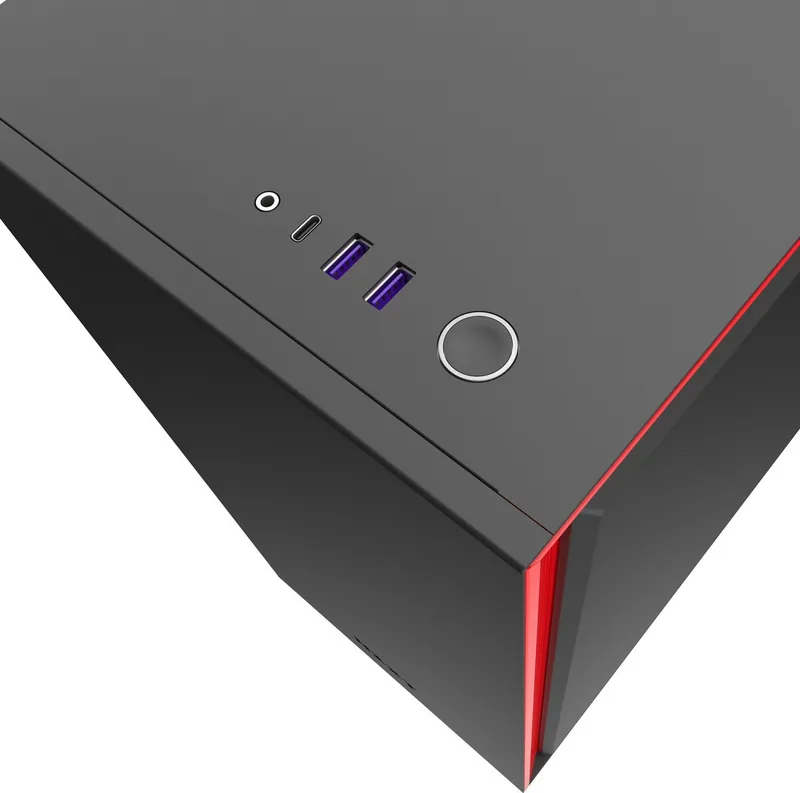
HD Audio Output
USB 3.1 Gen2 Type-C
USB 3.1 Gen1 Type-A
HDD LED
Power LED
Power switch
1.
2.
3.
4.
5.
6.
Sortie audio HD
USB 3.1 Gen2 Type-C
USB 3.1 Gen1 Type-A
Témoin disque dur
Témoin d’alimentation
Interrupteur marche/arrêt
1.
2.
3.
4.
5.
6.
HD-Audioausgang
USB 3.1 Gen2 Type-C
USB 3.1 Gen1 Type-A
Festplatten-LED
Betriebs-LED
Netzschalter
1.
2.
3.
4.
5.
6.
Salida de audio HD
USB 3.1 Gen2 Type-C
USB 3.1 Gen1 Type-A
LED de unidad de disco duro
LED de alimentación
Interruptor de encendido
1.
2.
3.
4.
5.
6.
Разъемы вентиляторов - Три разъема вентиляторов для трех каналов. Чтобы присоединить дополнительные вентиляторы,
воспользуйтесь разветвительными кабелями для вентиляторов (в комплекте).
Примечание. Первый 4-контактный разъем разветвительного кабеля предназначен для основного вентилятора.
Не используйте PWM и 3-контактные вентиляторы на одном канале.
Примечание. Для максимально эффективного использования интеллектуальной функции адаптивного шумоподавления
NZXT CAM необходимо подключить вентилятор ЦП к интеллектуальному устройству. Если вы решите это сделать,
необходимо будет отключить предупреждение вентилятора ЦП в настройках BIOS материнской платы.
Светодиодный разъем (RGB)- Внутри корпуса предварительно установлены две дополнительные светодиодные полосы.
Подключите дополнительные светодиодные полосы HUE 2 через концевой разъем, расположенный на верхней
светодиодной полоске. Для подключения Aer RGB 2 подключите непосредственно ко второму каналу RGB.
Разъем питания- Чтобы включить интеллектуальное устройство, вентиляторы и светодиодные ленты, подключите их к
блоку питания. Примечание. Не подключайте, если ПК включен.
/2
%
Controllo rapido
Non sono un robot
Risposta errata, riprova.
Chatta con il manuale del tuo NZXT H710 utilizzando l'IA
Ottieni risposte istantanee dall'IA dal manuale del tuo NZXT H710
Chiedi qualsiasi cosa sul NZXT H710. Le risposte provengono da questo manuale, con le pagine di riferimento.
Fai una Domanda
0/1000
Consigli H710?
SìNo
Domande
frequenti
A
Connect to the three available connectors or use the included splitters. Do not mix PWM and 3 pin fans on one channel. For best noise reduction, connect CPU fan to Smart Device and disable BIOS warnings.
Questa risposta è utile?
A
The standard warranty covers parts for two years. Refurbished products have a one-year coverage. Proof of purchase is required for any service claims or replacements.
Questa risposta è utile?
A
Yes, the H710i specifically supports vertical mounting with a bracket. Horizontal mount is also available using standard motherboard slots depending on your PCIe configuration.
Questa risposta è utile?
A
It uses an internal USB 2.0 connection to link with NZXT CAM software. This allows control of fan curves and RGB lighting without needing motherboard headers directly.
Questa risposta è utile?
A
It handles up to 360mm radiators on the front and 280mm on top. Ensure you have sufficient clearance for your chosen cooler model before installation.
Questa risposta è utile?
A
Yes, tools are not required to unscrew the thumb screws for access. The glass panels are tempered for safety during frequent opening.
Questa risposta è utile?
A
Yes, additional HUE 2 strips can connect to the end of the top strip. Aer RGB 2 fans plug directly into the second RGB channel for seamless integration.
Questa risposta è utile?
M: QW-35-FL
Vantaggie
Svantaggi
Vantaggi
Smart Device V2 simplifies fan and RGB control through software integration and USB connectivity for streamlined management.
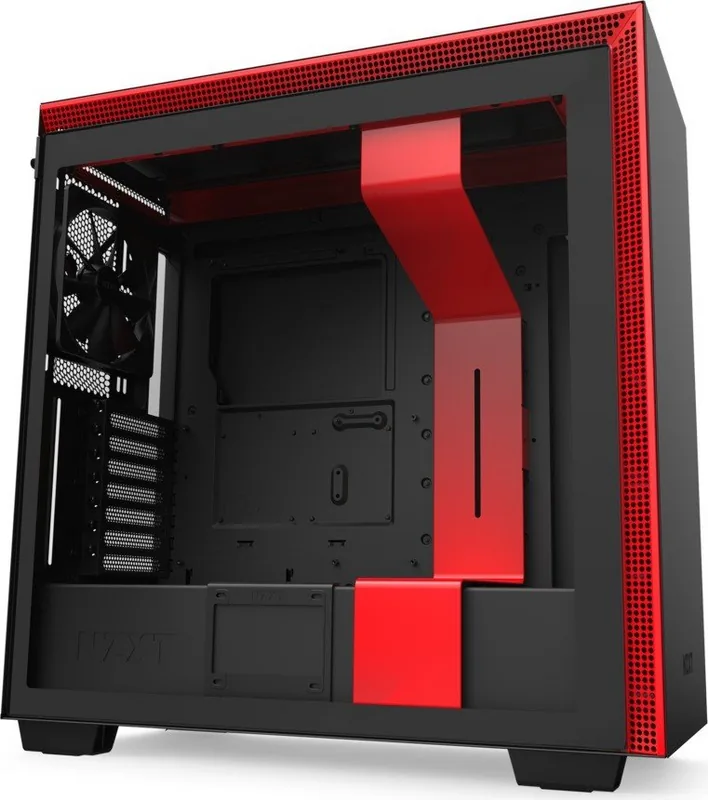
Dual tempered glass panels allow for fully showcasing custom PC builds while maintaining structural rigidity and safety.
Excellent cable management system with dedicated bar keeps wires hidden and improves interior airflow significantly.
Vertical GPU mounting option enhances visual presentation and saves space on the motherboard for other expansions.
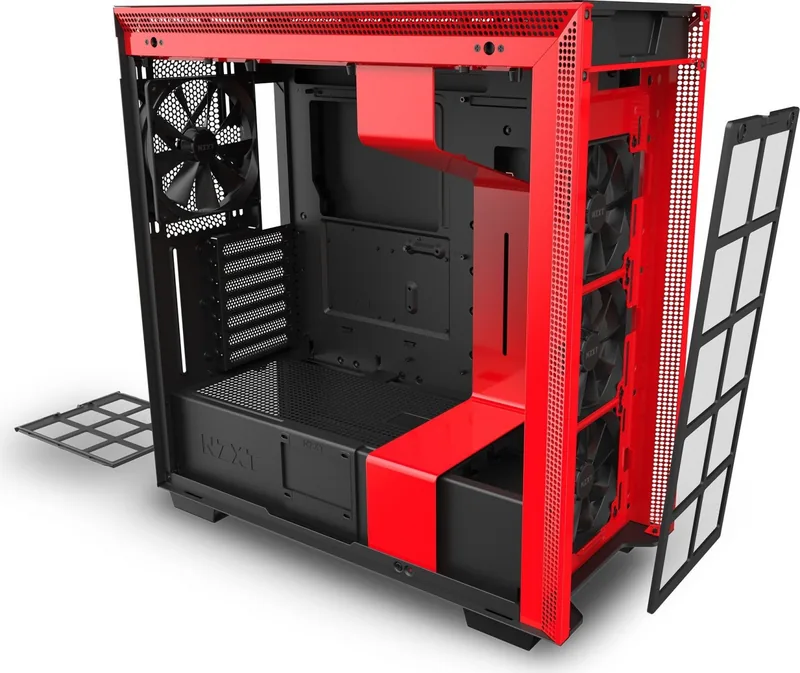
Supports extensive radiator sizes and cooling solutions including top and front mounts for advanced liquid cooling setups.
VS
Svantaggi
Mixing PWM and 3 pin fans on the same splitter channel is not recommended and requires careful configuration management.
Smart Device connection disables CPU fan warnings in BIOS which users must manually adjust before system boot.
Requires connecting to power supply to function, meaning cables must be routed internally before closing the case.
Only one USB 2.0 cable is used for Smart Device connection which limits additional port expansion via USB hub.
Warranty does not cover standard accessories like cooling fans or headsets included with the system package entirely.
M: QW-35-FL
Prodotto
Specifiche
Esterno
Non disponibile
Interno
2x 8,89 cm (orizzontale, binari unità), 2x 6,35 cm/8,89 cm, 5x 6,35 cm
Connessioni
1x USB-C 3.1 (10Gb/s, Header 20-Pin Key-A), 2x USB-A 3.0 (5Gb/s), 1x jack 3,5 mm (Line-Out)
Ventola (anteriore)
3x 11,99 cm, 1200 rpm, 85,52 m^3/h, 28 dB(A) oppure 2x 14,00 cm (opzionale)
Ventola (posteriore)
1x 14,00 cm, 1000 rpm, 116,97 m^3/h, 29 dB(A)
Ventola (sinistra)
Non disponibile
Ventola (destra)
Non disponibile
Ventola (superiore)
3x 11,99 cm (opzionale) oppure 2x 14,00 cm (opzionale)
Ventola (inferiore)
Non disponibile
Ventola (altre)
Non disponibile
Dimensioni radiatore
11,99 cm/14,00 cm/24,00 cm/27,99 cm/36,00 cm anteriore, 11,99 cm/14,00 cm/24,00 cm/27,99 cm/36,00 cm superiore, 11,99 cm posteriore
Scheda madre
fino a ATX (27,20 cm di larghezza)
Schede madri supportate
Mini-ITX (17,02 cm x17,02 cm)/Micro-ATX (24,38 cm x24,38 cm)/ATX (30,48 cm x24,38 cm)/E-ATX (30,48 cm x27,18 cm)
Alimentatore
ATX
Posizione alimentatore
in basso
Dissipatore CPU
max. 18,49 cm di altezza
Schede video
max. 41,30 cm
Dimensioni (Larghezza x Altezza x Profondità)
23,01 cm x51,59 cm x49,40 cm
Volume
58631,55 cm^3
Tipo chassis
Torre Media
Nota E-ATX
I produttori di schede madri e case indicano dimensioni diverse come E-ATX. Le schede madri con dimensioni E-ATX/SSI EEB di 30,51 cm x32,99 cm o 30,48 cm x33,02 cm non sono supportate.
Disposizione USB
Sinistra
M: QW-35-FL
Descrizione del prodotto
Descrizione
Building a high performance rig requires attention to detail and smart components. The NZXT H710 case stands out for enthusiasts seeking a balance of style and function. This mid-tower chassis features a sleek tempered glass side panel that showcases your internal hardware beautifully. At the heart of the system is the Smart Device V2, which simplifies control over fans and lighting directly from your motherboard or via software integration. Users appreciate the intuitive design that supports up to three fan connections across different channels. Cable management has been streamlined with a dedicated bar that keeps wires organized behind the panels. The front I/O module offers modern connectivity options including USB 3.1 Gen 1 and audio jacks for easy access. Lighting enthusiasts will find pre installed LED strips inside the case that add a vibrant touch to the build.
Integration with NZXT CAM software allows users to tweak fan speeds and RGB colors to match their specific aesthetic or performance needs. The adaptive noise reduction feature helps maintain a quiet system by adjusting speeds based on temperature. When installing your components, the vertical GPU mount support ensures graphics cards are secured in the optimal position. Cooling flexibility is abundant with mounts for radiators on the top and front, accommodating various water cooling setups. The smart device connects via internal USB 2.0 to bridge communication between your hardware and the control software.
Following the guidelines found in the NZXT H710 Manual ensures optimal setup conditions for airflow and electrical connections. It is important to note specific pin configurations to avoid mixing PWM and 3 pin fans on the same channel. Proper installation of the PSU bracket and drive trays maximizes storage and power delivery efficiency. For those looking to expand lighting further, additional HUE 2 strips can be connected without complex wiring. The design prioritizes ease of access for maintenance while maintaining a clean interior profile. Whether you are a competitive gamer or a content creator, this enclosure provides the stability needed for demanding workloads.
Maintenance is simplified with magnetic dust filters that can be removed without tools. The front steel panel features mesh designs to promote intake airflow. Ensure the PC is off when connecting the power connector to the smart device. Disable CPU fan warnings in BIOS if connecting the CPU fan to the smart device. Verify compatibility with your motherboard form factor, as the case supports Mini-ITX through EATX. Storage enthusiasts can utilize multiple SSD trays and HDD cages located for organized drive management.
In summary, this tower offers superior build quality and modern features. It caters to users who value both presentation and functionality in their computing environment. Proper setup ensures longevity and performance stability under load. Note that warranty coverage applies to components purchased within the eligible regions. Always check the latest firmware for the best performance experience.