
Manual.ly Logo

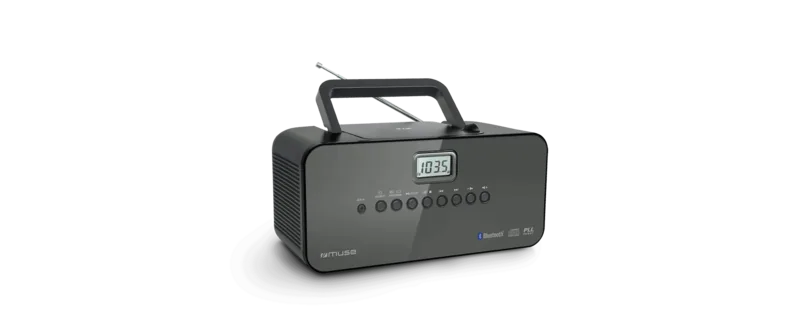
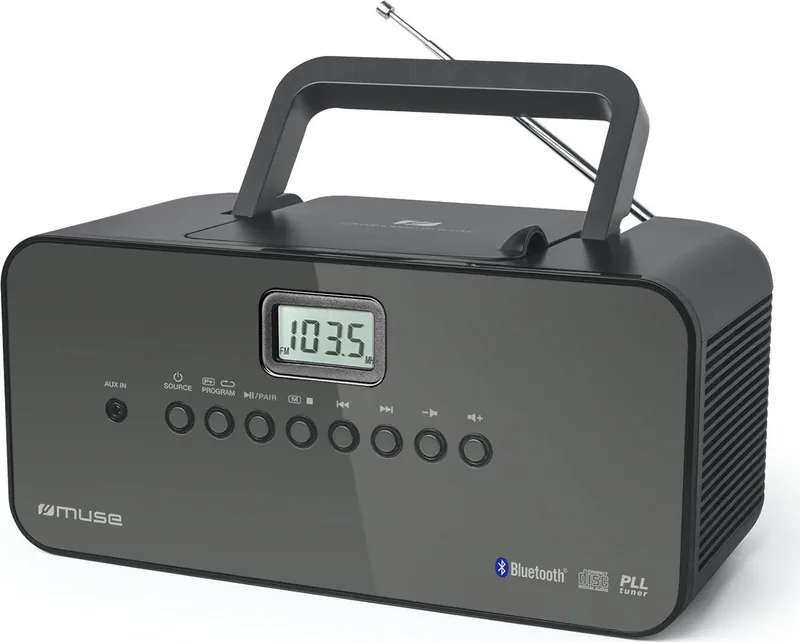
Muse M-22 Manuale

0,0 · 0 Valutazioni

Manuale PDF · 15 Pagine

Italiano

M: OA-GPT-5-NAN
pagina

/ 15

Loading...
d976c30e977b2df99508530257acca3ac3c8 page 5
EN - 3 EN - 4
SPECIFICATIONS
POWER SUPPLY:
AC:
DC:
POWER CONSUMPTION:
OUTPUT POWER:
BLUETOOTH
Bluetooth Version: V5.0
Bluetooth:2.402-2.48GHz
RF Output Power: 0 dBm
Working Distance: Up to 10 meters measured in open space (wall and structures may a󰀨ect range of device)
Specications are subject to change without notice.
RADIO
FREQUENCY RANGE
FM:
AM(MW):
230V 50Hz
9V 6x 1,5 V type UM-2/R14/ ‘C’
14W
2 x 1 Watt RMS
87.5 - 108 MHz
522 - 1620 kHz
SAFETY
CAUTION:
To reduce the risk of electric shock, do not disassemble this product. The unit contains no
user serviceable parts inside . Refer all servicing to a qualied technician.
The lightning ash with arrowhead within a triangle alerts the user to the presence of “dangerous voltage” inside
the product.
The exclamation point within a triangle to alert the user to the presence of important instructions in the literature
accompanying the appliance.
WARNING: TO PREVENT FIRE OR SHOCK HAZARD, DO NOT EXPOSE THIS PRODUCT TO RAIN OR MOISTURE.
ATTENTION: Invisible when safety devices are open or defective laser radiation . Avoid exposure to beam.
Device class 1 laser.
ATTENTION!
- Ensure proper ventilation of the unit and do not cover the ventilation openings with items such as newspapers,
tablecloths, curtains, etc. .
- Do not put any heat sources , such as lighted candles , on or near the appliance .
- Use this unit in a temperate climate .
- Do not expose the unit to dripping or moisture .
- Ensure a minimum distance of 5 cm around the unit to allow adequate ventilation.
- Do not place objects lled with liquids, such as vases, on or near the appliance.
- The plate is located at the rear of this unit.
- The mains plug is used to disconnect the device and must be easily accessible. To completely remove power from the
unit, unplug the AC power plug from the outlet completely. The AC power plug can not be constrained and must be
easily accessible during use.
- As a result of electrostatic phenomena and / or electrical transients, the product may malfunction and reset may be
necessary.
- Do not expose the batteries to excessive heat such as direct sunlight, re or other sources of heat.
- Please respect the environment when disposing of used batteries.
- To prevent splashing, place objects lled with liquids, such as vases, near the product.
- Under the inuence of fast transient and / or electrostatic electric phenomenon, the product may malfunction and the
user must perform a power reset of the device.
- The normal function of the product may be disturbed by strong Electro-Magnetic Interference. If so, simply reset the
product to resume normal operation by following the instruction manual. In case the function could not resume, please
use the product in other location.
If you want to dispose this product, remember to recycle in a landll for household electric appliances. Learn
to know your recycling center nearest you. Check with local authorities or your dealer for details. (Directive on
Waste Electrical and Electronic Equipment )
CLASS 1 LASER PRODUCT
APPAREIL À LASER DE CLASSE 1
PRODUCTO LASER DE CLASE 1
PRODUTO LASER CLASSE 1
PROGRAM PLAYBACK
1. Insert the disc with the label facing up, into the compartment and close the CD door.
2. Press .
3. Press .
4. Select the desired track with or then press to save the program in memory.
5. Repeat step 4 until the end of your programming.
6. Press to start playback. This PROGRAM function is automatically cancelled when opening the CD door or shutdown
of the unit.
Note: CD up to 20 programs.
MAINTENANCE
CLEANING
CAUTION: Disconnect this device from any power source before cleaning.
- Use a soft, clean, dry cloth. Dust regularly ventilation holes on the back or sides of the apparatus.
- The use of solvents or abrasive products or with a basis of alcohol can damage the unit.
- If an object or liquid enters the unit, unplug it immediately and have it checked by an authorized engineer.
Notes on discs
* Do not use irregularly shaped discs (example : heart-shaped, octagonal ones). The unit may malfunction.
* Do not place more than one disc in the compartment.
* Do not attempt to open the disc tray during playback.
* Do not touch the lens. You could cause a malfunction.
* If the disc is scratched, dirty or smudged with ngerprints, the device may not work. Before playing, wipe the disc with a
cloth. Proceed from the center outwards. Do not store discs in places with high temperature or high humidity. They could
bend. After reading, replace the disc in its case.
IMPORTANT NOTE
Remove the disc from its compartment if the device is to be transported.
AUXILIARY INPUT ( AUX . IN)
1. Connect one end of the cable (not supplied) to the auxiliary input connector of the device.
AUX IN
2. Connect the other end of the cable to the headphones jack or the line out jack of your external audio appliance.
3. Press to select the auxiliary mode. « AUX » appears on the display. Normally use your external audio appliance;
the sound automatically goes through the speakers of your device.
4. Adjust the volume to the desired level.
5. Disconnect the external appliance from the auxiliary input to stop playback.
LISTENING TO DISC
1. Press to turn the unit on.
2. Open the CD door.
3. Insert the disc with the label facing up and then close the compartment.
4. Press to select the CD mode.
5. After a few seconds, the total number of tracks and the CD icon will appear on the display.
To:
- Pause Playback: Press once / PAIR
- Resume playback: Press again / PAIR
- Permanently stop playback: Press
- Search forward or backward: Press and hold or
- To skip to the next or previous track: press or
DISK ERROR
Note: If the disc is dirty, damaged or unreadable or if it is placed upside down, “NO” is displayed. If this happens, clean the
disc, insert the disc correctly or try another disc.
If you encounter CD playback problem, either of the following ways may help:
1. Turn o󰀨 the unit. Disconnect the AC power cord from AC outlet and reconnect it again.
2. Clean your CD disc.
REPEAT PLAYBACK
Repeatedly press to select one of the following playback modes. Track Repeat, Repeat All.
TO DISABLE THE REPEAT PLAYBACK
Press repeatedly until the repeat mode indicator disappears from the display. The repeat function is automatically
cancelled at the opening of the door of the CD or the shutdown of the unit.
NEW ONE S.A.S
10, Rue de la Mission, 25480 Ecole Valentin, France
RD-3353TC IB MUSE 001 REV2.indd 5RD-3353TC IB MUSE 001 REV2.indd 5 2023/5/17 15:38:342023/5/17 15:38:34

Chatta con il manuale del tuo Muse M-22 utilizzando l'IA

Ottieni risposte istantanee dall'IA dal manuale del tuo Muse M-22

Chiedi qualsiasi cosa sul Muse M-22. Le risposte provengono da questo manuale, con le pagine di riferimento.

M-22 Programma di manutenzione

Regolarmente
Pulire le prese d'aria per la ventilazione

Usare un panno morbido, pulito e asciutto per rimuovere regolarmente la polvere dalle prese d'aria sul retro o sui lati dell'unità. Non coprire queste aperture con oggetti.

Mostra nel manuale (pagina 5)
Prima dell'uso
Pulire il disco CD

Passare un panno morbido dal centro verso l'esterno prima di riprodurre il disco se è graffiato, sporco o ha impronte digitali.

Mostra nel manuale (pagina 5)
M: QW-35-FL

Fai una Domanda

0/1000

Consigli M-22?

Sì No

Domande frequenti

A

M-22 поддерживает воспроизведение CD (стандартные аудио-CD), FM и AM (MW) радио, беспроводную передачу по Bluetooth и AUX-вход для проводных внешних аудиоисточников.

Questa risposta è utile?

A

Выберите режим Bluetooth на устройстве, включите Bluetooth на телефоне и выполните поиск устройств. Выберите "M-22 BT" и подтвердите. При необходимости введите PIN 0000. Успешное сопряжение сопровождается звуковым сигналом и иконкой.

Questa risposta è utile?

A

Да. Устройство принимает шесть батареек 1.5 В типа C (UM-2/R14). Вставляйте их с соблюдением полярности и отключите сетевой шнур для работы от батарей. Извлекайте батареи при длительном хранении, чтобы предотвратить утечки.

Questa risposta è utile?

A

Вы можете вручную или автоматически настроить станцию, нажать кнопку памяти, чтобы выбрать слот предустановки (например, P01) и сохранить. Сохранённые станции перезаписывают любые существующие на выбранном номере предустановки.

Questa risposta è utile?

A

Если на дисплее отображается ошибка, очистите диск от центра к краю, убедитесь, что он вставлен печатной стороной вверх, попробуйте другой диск и при необходимости выключите и снова включите питание, отсоединив и подключив сетевой шнур.

Questa risposta è utile?

A

Bluetooth v5.0, частота 2.402–2.480 ГГц, выходная мощность RF 0 dBm. Диапазон — до примерно 10 метров в открытом пространстве; препятствия и стены могут уменьшать эффективный радиус.

Questa risposta è utile?

A

Да. Держите вентиляцию свободной (примерно 5 см зазор), избегайте влаги и нагрева, отключайте питание перед чисткой, используйте мягкую сухую ткань, избегайте растворителей и утилизируйте батареи и устройство в соответствии с местными правилами.

Questa risposta è utile?

M: OA-GPT-5-NAN

Vantaggi e Svantaggi

Vantaggi

  • Несколько вариантов воспроизведения: CD, FM/AM-радио, Bluetooth v5.0 и AUX-вход.
  • Портативный: питание от сети или шести батареек типа C для использования вне дома.
  • Простое управление с предустановками, программным воспроизведением (до 20 треков) и режимами повтора.
  • Bluetooth-сопряжение простое; устройство отображается как "M-22 BT" и поддерживает беспроводную передачу до 10 м.
  • Включены рекомендации по обслуживанию и уходу за CD; устройство соответствует применимым стандартам ЕС.
VS

Svantaggi

  • Ограниченная выходная мощность (2 × 1 Вт RMS) — не идеально для больших помещений или громкого прослушивания.
  • Механизм CD чувствителен к поцарапанным/грязным дискам; нестандартные формы дисков не поддерживаются.
  • Питание от батарей использует шесть элементов C, что может быть громоздко и затратно при частом портативном использовании.
  • Диапазон и производительность Bluetooth могут быть ухудшены стенами и препятствиями; рекомендуется прямая видимость.
  • Базовый набор функций без продвинутых аудиоулучшений (эквалайзер, цифровое радио или потоковые приложения).
M: OA-GPT-5-NAN

Prodotto Specifiche

Formati audio

CD-Audio, CD-R/RW

Sintonizzatore

FM, AM

Display

LED, Ora

Connessioni audio

Ingresso AUX (jack da 3.5mm)

Senza fili

Bluetooth

Alimentazione

Pila tipo C, Funzionamento a rete

Caratteristiche speciali

Antenna telescopica

Peso

1,40 kg

M: GO-GEM-FL-25

Descrizione del prodotto Descrizione

Muse M-22 — Компактное Bluetooth CD-радио

Muse M-22 — универсальный портативный аудиоплеер, объединяющий CD-проигрыватель, FM/AM-радио, Bluetooth-потоковую передачу и AUX-вход в лёгком устройстве с питанием от батареек или сети. С телескопической FM-антенной, легко читаемым ЖК-дисплеем и фронтальными динамиками он рассчитан на пользователей, которые хотят простое универсальное музыкальное решение для дома, путешествий или использования на открытом воздухе.

Плеер принимает стандартные аудио-CD (до 20 треков в программном воспроизведении), поддерживает паузу/стоп/перемотку и режимы повтора, и уведомляет об ошибках диска при загрязнении или повреждении. Радио включает ручную и автоматическую настройку, предустановки станций и подсказки по оптимизации приёма (удлините антенну для FM, поворачивайте устройство для AM). Bluetooth v5.0 обеспечивает беспроводную передачу на расстоянии до ~10 метров в открытом пространстве и ручное сопряжение по имени устройства "M-22 BT" (по умолчанию PIN 0000 при необходимости).

Варианты питания гибкие: работа от сети переменного тока (230 В~50 Гц) или от шести батареек типа C для портативного использования. Приведены заметки и рекомендации по безопасности при использовании батарей — извлекайте батареи при длительном хранении, не смешивайте типы батарей и не подвергайте их воздействию тепла. Устройство соответствует соответствующим европейским директивам и содержит стандартные предупреждения о влажности, вентиляции, лазерной оптике класса 1 и инструкции по утилизации/переработке.

Управление простое: одна кнопка источник/питание переключает режимы FM, AM (MW), CD, Bluetooth и AUX; выделенные кнопки отвечают за воспроизведение/пауза/сопряжение, память/предустановки, настройку/пропуск, громкость вверх/вниз и программирование/сохранение для воспроизведения CD. Вход AUX позволяет подключать внешние аудиоустройства через кабель и воспроизводить звук через динамики устройства.

Обслуживание простое: выключайте питание перед чисткой, используйте мягкую сухую ткань, избегайте растворителей и держите вентиляционные отверстия чистыми от пыли. Для ухода за CD протирайте диски от центра к краю, избегайте нестандартных по форме носителей и извлекайте диски перед транспортировкой устройства.

Примечания:

  • Bluetooth: V5.0, 2.402–2.48 ГГц, выходная мощность RF 0 dBm, до 10 м в открытом пространстве.
  • CD: поддержка программного воспроизведения (до 20 треков), режимы повтора и стандартная обработка ошибок CD.
  • Питание: сеть 230 В 50 Гц или DC 9 В от 6×1.5 В батарей C.

Краткое резюме

  • Портативное CD-радио с Bluetooth-потоком и AUX-входом
  • Простое управление, предустановки станций и программирование CD
  • Двойное питание: сеть или батареи; CD-механизм класса 1
M: OA-GPT-5-NAN

© Copyright 2026 Manual.ly