Manual.ly Logo

Ksix TrueBuds 3 Manuale

0,0 · 0 Valutazioni

Manuale PDF · 19 Pagine

Italiano

M: QW-35-FL
pagina

/ 19

Loading...
b1cd6628ba4a539ec125a90dae691a06387d page 1
TRUE BUDS 3
Earphones
User manual
Technical information
Bluetooth version: 5.0
Bluetooth profile: A2DP / AVRCP / HFP
Transmission range: ≈ 10 m
Sensitivity: 104 ± 3 dB
Frequency range: 20 ~ 20 000Hz
Impedance: 32 Ω
Weight: 36 g
Single earbud weight: 3.9 g
Play time: ≈ 3 hours
Standby time: ≈ 300 hours
Charging time for the charging case: ≈ 2 hours
Earbud charging time: ≈ 2 hours
Charging case battery capacity: 320mAh
Earbud battery capacity: 40mAh
Input: 5V – 1A
In the box
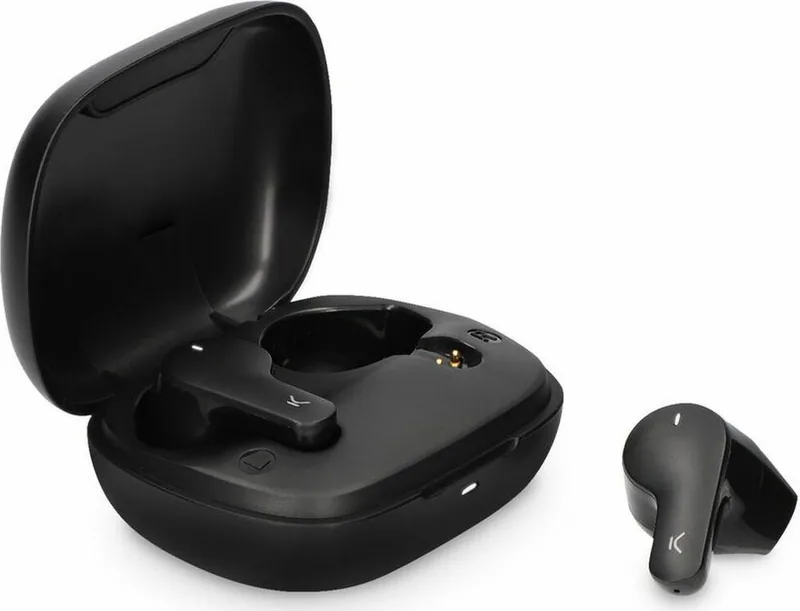
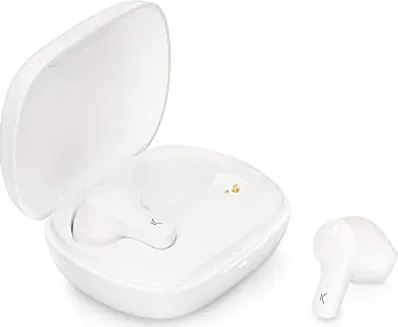
1 x charging case
2 x earphones
1 x type C charging cable
How to connect the earphones
Turning on
The earphones are automatically turned on when the charging case is opened.
If they are out of the charging case, long press the touch surface of both earphones for 3
seconds to turn them on. The red and white indicator lights will flash for 1 second and the
word “Connected” will be heard.
Pairing (first use)
Open the charging case. The indicator light of both earphones will alternately flash red and
white. After 10 seconds, the earphones will pair automatically, and the indicator light will
start flashing red and light slowly. This means they are ready to be paired with the device.
Enable the Bluetooth function on your device, search for a device named TRUEBUDS3 and
select “connect”. Once the connection has been successful, the word “Connected” will be
heard.
If the device Bluetooth version is lower than 3.0, enter the default security code 0000
when the password window pops up
Turning o
Introduce the earphones in the charging case and close the cover to turn them o.
They can also be turned o by holding pressed the touch surface of both earphones for 5
seconds. The red and white indicator lights will flash for 1 second and the word “Powered
o”.
The earphones are turned o automatically after 3 minutes of disconnection from the
device.
How to use
Use the touch surface to change from one song to another and to manage incoming calls.
• Play/Pause: Short press the touch surface of any of the earphones.
• Previous/Next song: Long press the touch surface of the left earphone for 2 seconds to
go back to the previous song. Long press the touch surface of the right earphone for 2
seconds to change to the next song.
• Answer/Hang up a call: When a call comes in, short press the touch surface of any of the
earphones to answer it. Once the call is in process, short press the touch surface of any of
the earphones to hang it up.
• Reject a call: When a call comes in, long press the touch surface of any of the earphones
for 2 seconds to reject it.
• Reset: When both earphones are o, long press the touch surface of both earphones for 8
seconds to reset the pairing information.
• Siri: Short press the touch surface of any of the earphones three times to open Siri.
How to charge
When the earphones have low battery, the indicator light will flash red slowly, and the
phrase “Battery low” will be heard.
Charging the earphones
Introduce both earphones in the charging case and close the cover. Please, check that both
earphones are correctly introduced in the case. The indicator light of the charging light will
turn on, and the indicator lights of both earphones will turn red.
Once the earphones are fully charged, the indicator light will fade. It takes about 2 hours to
charge the earphones completely. A fully charged charging case can be used to charge the
earphones more than 2 times.
Charging the charging case
Please, use a 5V-1A charger. During charging, the charging case indicator light will flash red.
When it is fully charged, the red light will turn into static mode. It takes about 2 hours to
charge the charging case completely.
Maintenance recommendations
• Regularly clean the product with a dry cloth. The product must be disconnected or
switched o when you clean it.
• Keep the connectors and/ or ports free from dust, lint, etc. to prevent improper
connections.
• Avoid breaking the device. Do not put objects over it or bend it too strong.
• If the product includes a cable do not bend it too strong and do not pull from it to unplug
the product.
• Do not wet the product. Keep it always in a dry place, away from humidity.
• When not using the product, store it in a place free from dust, dirt, lint, liquids, etc.
z• If water or other liquids enter the product interior, unplug it immediately from any
attached power source or device it is connected to.
• Avoid dropping or hitting the product. It might be damaged.
• Do not use the product for anything other than its intended use.
• Please recycle the product in accordance with local environmental laws and regulations.
Safety information
Please read the following instructions before using the device for the first time:
• When you use device keep it away from heat sources (fire) and from humidity sources
(water and other liquids).
• If the product is wet or damaged do not us it.
• Do not use the product with wet hands.
• Do not leave the product in contact with flammable materials.
• Do not expose the product to high temperatures (for example: inside a car during hot
weather)
• Do not throw the product into fire.
• Keep the product away from children.
• Disconnect or switch o the product if you are not going to use for a long period of time.
• Do not use the device if you perceive any visible defects.
• Do not attempt to open or puncture the product. You might damage it.
• Do not use the product with incompatible devices.
• Do not dismount or modify the product. These actions will invalidate the Warranty.
Legal Note
Hereby, Atlantis Internacional S.L. declares that this product is in compliance with the
essential requirements and other relevant provisions of Directive 2014/53/EC.
The features and functions described in this manual are based on tests made by Atlantis
Internacional S.L. It is the user’s responsibility to examine and verify the product after its
purchase. Atlantis Internacional S.L. is not responsible and will never be liable for any
personal loss or injury, economical loss, material loss or any damage due to misuse, abuse
or improper installation of the product.
For electronical devices with Bluetooth: Atlantis Internacional S.L. is not responsible and
will never be liable for any function, communication and connection failure between the
product and Bluetooth enabled devices.
Electronic and electrical devices disposal
This symbol indicates that electrical and electronic equipment is to be collected separately.
• This product is designated for separate collection at an appropriate collection point. Do
not dispose of as household waste.
• The final price of this product includes the cost necessary for the correct environmental
management of the generated waste.
• If the equipment uses batteries, they must be removed from the equipment and disposed
in an appropriate collection center. If the batteries cannot be removed, do not
attempt to do it yourself since it must be done by a qualified professional.
• Separate collection and recycling helps conserve natural resources and prevent negative
consequences for human health and the environment that might result from incorrect
disposal.
• For more information, contact the retailer or the local authorities in charge of waste
management.
CE Declaration of Conformity
We hereby declare that the product (s) listed below satisfies the provision for CE-marking
according to the following European directive(s):
EN 55032:2015/A11:2020
EN IEC 61000-3-2:2019
EN 61000-3-3:2013/A1:2019
EN 55035:2017/A11:2020
Article: BXTW03B3 / BXTW03N3
EAN: 8427542122144 / 8427542122151
Features:
dc 3.7V By battery or DC 5V by adapter
Manufacturer:
ATLANTIS INTERNACIONAL, S.L.
Address:
Carrer del Crom, 53, 08907 L'Hospitalet de Llobregat, Barcelona (Spain)
Place and date of the declaration:
L’Hospitalet de Llobregat, February 21, 2022
Nico Broder
General Manager

Chatta con il manuale del tuo Ksix TrueBuds 3 utilizzando l'IA

Ottieni risposte istantanee dall'IA dal manuale del tuo Ksix TrueBuds 3

Chiedi qualsiasi cosa sul Ksix TrueBuds 3. Le risposte provengono da questo manuale, con le pagine di riferimento.

TrueBuds 3 Programma di manutenzione

Regolarmente
Pulire il prodotto con un panno asciutto

Assicurarsi che il prodotto sia scollegato o spento prima della pulizia.

Mostra nel manuale (pagina 1)
Secondo necessità
Mantenere connettori e porte privi di polvere

Rimuovere polvere, lanugine e detriti da connettori e porte per evitare collegamenti impropri.

Mostra nel manuale (pagina 1)
M: qwen/qwen3.8-flash

Fai una Domanda

0/1000

Consigli TrueBuds 3?

Sì No

Domande frequenti

A

Apri la custodia di ricarica per accenderli automaticamente. Abilita Bluetooth sul tuo dispositivo, cerca TRUEBUDS3 e seleziona connetti. Se richiesto un codice su dispositivi sotto Bluetooth 3.0, inserisci 0000.

Questa risposta è utile?

A

Gli auricolari offrono circa tre ore di tempo di riproduzione su una singola carica. La custodia di ricarica fornisce energia sufficiente per ricaricarli più di due volte, estendendo l'uso totale significativamente.

Questa risposta è utile?

A

Sia gli auricolari che la custodia di ricarica richiedono circa due ore per un ciclo di carica completo usando un adattatore standard da cinque volt uno ampere. Le luci indicatrici smetteranno di lampeggiare quando completamente alimentate.

Questa risposta è utile?

A

Sì. Quando entrambi gli auricolari sono spenti, tieni premuto a lungo la superficie touch su entrambi simultaneamente per otto secondi. Questo azzererà tutte le informazioni di abbinamento per nuovi tentativi di riconsessione.

Questa risposta è utile?

A

Sì. Puoi attivare Siri premendo brevemente la superficie touch su uno degli auricolari tre volte velocemente. Questo funziona perfettamente con dispositivi supportati.

Questa risposta è utile?

A

Se il liquido entra all'interno, scollega immediatamente da qualsiasi fonte di alimentazione. Non usare se bagnato o danneggiato. Tieni i prodotti in luoghi asciutti per evitare esposizione all'umidità.

Questa risposta è utile?

A

Il pacchetto include una custodia di ricarica, due auricolari e un cavo di ricarica Type C. Controlla tutti gli elementi all'acquisto per assicurare la completezza.

Questa risposta è utile?

M: QW-35-FL

Vantaggi e Svantaggi

Vantaggi

  • La connettività Bluetooth 5.0 garantisce gamma stabile fino a 10 metri per streaming ininterrotto.
  • L'accensione automatica aprendo la custodia semplifica il flusso di lavoro quotidiano efficacemente.
  • Gli avvisi vocali confermano lo stato della connessione e i livelli della batteria udibilmente durante l'operazione.
VS

Svantaggi

  • Tre ore di tempo di riproduzione richiedono ricarica frequente per uso pesante durante il giorno.
  • Il processo di ricarica richiede due ore che ritarda la disponibilità per situazioni di riutilizzo immediato.
  • Il prodotto manca di classificazione impermeabilità specificata quindi il rischio di danno da umidità rimane più alto.
M: QW-35-FL

Prodotto Specifiche

Tipo

Auricolari

Formato

Totale Wireless, Senza ganci

Microfono

Integrato

Senza Fili

Bluetooth 5.0

Controlli

Controllo touch

Autonomia Batteria

3 ore, 10 ore (con custodia di ricarica)

Batteria

Porta di ricarica USB-C, Custodia di ricarica (320 mAh), Tempo di ricarica 2 ore

Fascia di Frequenza

20 Hz - 20 kHz

Impedenza

32 Ohm

Sensibilità

104 dB

Peso

3,97 g (ciascuno), 36,00 g (custodia)

M: QW-35-FL

Descrizione del prodotto Descrizione

Esplorazione funzionalità Ksix TrueBuds 3

Benvenuti nel mondo dell'audio fluido con i Ksix TrueBuds 3. Questi auricolari wireless ridefiniscono la comodità per utenti che cercano alte prestazioni senza complessità. Progettati con tecnologia all'avanguardia, presentano versione Bluetooth 5.0 per connessioni stabili fino a dieci metri. Che tu stia viaggiando o faccendo allenamento, la gamma di trasmissione assicura che la tua musica resti ininterrotta. L'interfaccia utente si affida pesantemente a superfici touch intuitive. Puoi gestire la riproduzione, rispondere alle chiamate e attivare assistenti vocali direttamente dagli auricolari. Questa funzionalità è dettagliata ampiamente all'interno del Manuale Ksix TrueBuds 3, assicurando che ogni funzione sia utilizzata correttamente. Premimenti brevi attivano le funzioni di riproduzione e pausa perfettamente. Premimenti lunghi navigano le tracce in avanti o indietro efficientemente. Le chiamate possono essere risposte premendo una volta o rifiutate tenendo premuto per la durata.

Qualità Sonora e Specifiche di Progetto

La qualità audio rimane una priorità per i consumatori moderni. Con un intervallo di frequenze da venti a ventimila hertz e sensibilità di centoquattro decibel, la chiarezza è assicurata. L'impedenza sta a trentadue ohm, fornendo profili sonori bilanciati adatti a vari generi. Il peso è anche considerato durante la progettazione. Ogni singolo auricolare pesa solo tre virgola nove grammi, rendendoli confortevoli per sessioni di indossamento prolungate. Il peso totale inclusa la custodia è trentasei grammi, entrando facilmente nelle tasche. Il tempo di standby raggiunge circa trecento ore quando immagazzinati correttamente nella scatola.

Gestione Alimentazione e Dettagli di Ricarica

La gestione della batteria è critica per l'uso quotidiano. Il tempo di riproduzione dura circa tre ore su una singola carica. Questo potrebbe sembrare breve per gli audiolfili, ma la custodia di ricarica estende l'utilità significativamente. Tiene due cariche complete, permettendo più di sei ore di ascolto prima di dover inserire la spina nella custodia stessa. La ricarica richiede circa due ore sia per gli auricolari che per la custodia usando un adattatore da cinque volt uno ampere. Avvisi vocali come Connesso o Spento forniscono conferma dei cambiamenti di stato automaticamente. Avvisi batteria bassa avvertono gli utenti tramite luci lampeggianti e frasi parlate. Mantenere i connettori liberi da polvere previene connessioni improprie nel tempo.

Istruzioni per l'Uso e Suggerimenti di Manutenzione

L'impostazione della connettività coinvolge l'apertura della custodia dove gli indicatori lampeggiano rosso e bianco. L'accoppiamento cerca un dispositivo nominato TRUEBUDS3 sul tuo telefono. I codici di sicurezza possono essere richiesti per vecchie versioni Bluetooth sotto tre virgola zero. La manutenzione richiede di mantenere il prodotto asciutto e pulito con un panno asciutto. Evita l'esposizione a fonti di calore o liquidi per prevenire danni. Conserva sempre lontano dall'umidità quando non in uso. Il cavo incluso Type C semplifica la logistica di ricarica. Le linee guida di sicurezza consigliano contro perforare o modificare l'unità per mantenere la validità della garanzia. Lo smaltimento ambientale è anche enfatizzato per ridurre l'impatto dello spreco elettronico. Infine, il produttore dichiara conformità con direttive europee riguardanti la compatibilità elettromagnetica. Goditi audio affidabile con questi auricolari ben equipaggiati oggi. Ricorda di controllare la guida regolarmente per programmi di manutenzione ottimali e passaggi di risoluzione dei problemi per garantire la longevità dei tuoi componenti hardware.

M: QW-35-FL

© Copyright 2026 Manual.ly