
Jays m-Seven True Wireless Manuale
Manuale PDF · 31 Pagine
Italiano



Controllo rapido
Risposta errata, riprova.
Chatta con il manuale del tuo Jays m-Seven True Wireless utilizzando l'IA
Ottieni risposte istantanee dall'IA dal manuale del tuo Jays m-Seven True Wireless
Chiedi qualsiasi cosa sul Jays m-Seven True Wireless. Le risposte provengono da questo manuale, con le pagine di riferimento.
Fai una Domanda
Consigli m-Seven True Wireless?
Sì NoDomande frequenti
Place both earpieces in the charging case ensuring contact. Hold the top center of both simultaneously until LEDs flash purple twice. This resets the connection and enters pairing mode. Wait for the left LED to turn off and the right to flash white and red before connecting.
Questa risposta è utile?
Northbaze Group AB provides a twelve-month limited warranty from the date of purchase. This requires proof of purchase showing date and product name. The warranty covers manufacturing faults like material or design defects but excludes wear or accidental damage.
Questa risposta è utile?
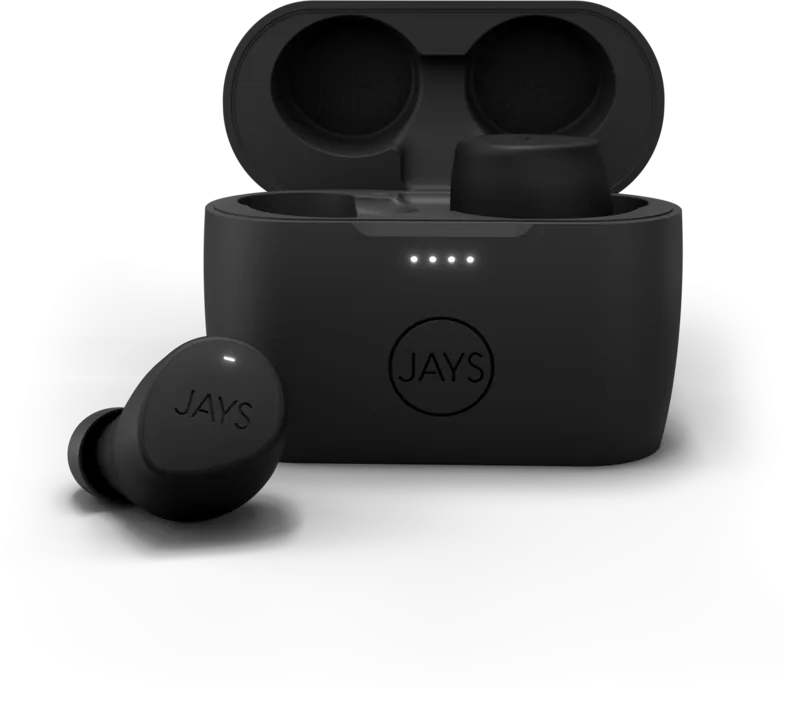
The case has four white LEDs on the front. One light means 25 percent charge, two lights mean 50 percent, three lights mean 75 percent, and four lights indicate a full 100 percent charge. Press the button on the back to view status.
Questa risposta è utile?
No. You should only clean them with a soft dry cloth. Never use water, cleaning detergent, or other substances. These items may permanently damage the earphones or internal components. Moisture exposure is prohibited.
Questa risposta è utile?
Remove both earphones from the case. The LEDs will flash. Select Jays m-Seven True Wireless in your device Bluetooth settings. The right earpiece LED will turn off upon successful connection. If connection fails, reset the earphones.
Questa risposta è utile?
No. Do not use the earphones within 10 cm of a pacemaker. The magnetic material in the earphones can interfere with medical devices. Keep them at a safe distance to prevent health risks.
Questa risposta è utile?
Vantaggi e Svantaggi
Vantaggi

- Automatic reconnection to previously used Bluetooth devices
- Clear visual LED indicators for battery level on case
- Twelve-month limited manufacturer warranty coverage
- Simple touch control for calls and volume adjustment
- Supports voice command activation for hands free use
Svantaggi

- Battery capacity loss due to age not covered by warranty
- Strict temperature limits for charging and storage operations
- No water resistance makes moisture exposure a risk factor
- Cannot disassemble or repair user serviceable internal parts
- Must be disposed of with electronic waste not regular trash
Prodotto Specifiche
Tipo
Auricolari (In-Ear)
Fattore di Forma
Senza Fili
Design
Chiuso
Microfono
Integrato
Senza Fili
Bluetooth 5.0
Controlli
Controllo Tattile
Autonomia Batteria
9,5 h, 38 h (con custodia di ricarica)
Batteria
Porta di ricarica proprietaria, 1 h di ricarica
Intervallo di Frequenza
20 Hz - 20 kHz
Impedenza
16 Ohm
Sensibilità
85 dB
Driver
6 mm
Caratteristiche Dispositivo
Resistente all'acqua (IPX5)
Caratteristiche Software
Assistente Vocale (Apple Siri, Google Assistant)
Peso
5,9 g (ciascun auricolare), 43 g (custodia di ricarica)
Descrizione del prodotto Descrizione
Discover the Jays m-Seven True Wireless Experience
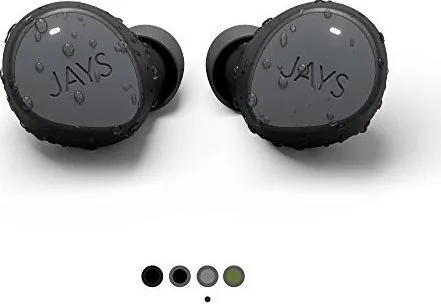
Experience premium sound with the Jays m-Seven True Wireless earphones. Designed in Sweden, these headphones offer a sleek portable solution for music lovers. The controls are intuitive. You can skip tracks, adjust volume, answer calls, and activate voice command easily. The interface ensures you stay connected without fumbling with buttons. The ergonomic design fits comfortably for long listening sessions. Users can manage music playback directly from the earpieces for convenience. Forward and backward controls allow seamless navigation through playlists.
Charging and Battery Life
Managing power is straightforward with the included charging case. Place both earpieces inside the case to charge automatically. The red flashing LED indicates charging status. A full charge takes approximately two and a half hours using any certified USB power output. The case itself displays battery health via four white LEDs. Each light represents one quarter of charge capacity up to full power. This allows users to track remaining energy accurately without guessing. The earphones power off automatically when returned to the case. They also turn off after a few minutes if Bluetooth cuts out. This saves battery life during storage and prevents accidental drain. This wireless audio solution integrates well with modern smartphone technology. Bluetooth settings on your device must be active for connection. Right LED flashing red and white signifies pairing mode activation. Left LED turns off upon successful interconnection between earpieces. This synchronization process happens automatically upon removal from charge. Power management system ensures automatic shut off when idle.
Safety and Warranty Coverage
Your safety is paramount with this device. Avoid extreme temperatures and moisture. The lithium battery requires specific handling to prevent hazards like explosions or leaks. Do not expose to rain or submerge in water. Keep away from pacemakers and vehicle airbags. Northbaze Group AB offers a twelve-month limited warranty. This covers manufacturing faults but not accidental damage or normal wear. Keep your proof of purchase safe for any claims. You must contact the reseller for service. Proof must show date and product name. Do not dispose of with regular waste. FCC compliance ensures safety for all users. Temperature restrictions prevent battery swelling or failure in extreme conditions. Chemical cleaning agents must never be applied to the plastic casing. Regular inspection for physical damage is recommended before each use. Warranty service contact is initiated through the original authorized reseller. International compliance standards ensure safety in multiple global regions. Do not use while driving, jogging or walking in noise. Audio safety guidelines recommend limiting high volume listening periods.
Troubleshooting and Maintenance
Cleaning requires a soft dry cloth. Water or detergents may damage the product permanently. If pairing fails, reset the earphones. Place them in the case and hold the top center until LEDs flash purple twice. This ensures a clean connection. Bluetooth interference can also cause issues. Move closer to your streamer or change Bluetooth settings. Ensure no other wireless equipment is close by. Keep separation from other devices if problems persist. Body or distance can also affect signal transmission. Reset ensures interconnection mode activates correctly. Audio performance remains stable even in environments with wireless congestion. Voice commands assist with calling and playback without touch. Battery capacity indicators help plan recharging cycles for daily use.
Notes: Always read instructions. Dispose properly. Avoid dropping or impacting the device. This ensures longevity and performance over time.
Cerca di 67.732 Manuali online


Digita il marchio o il modello