
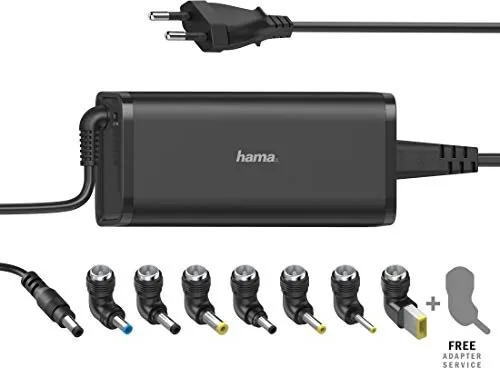
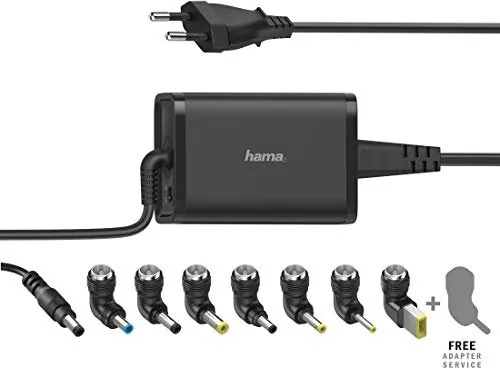
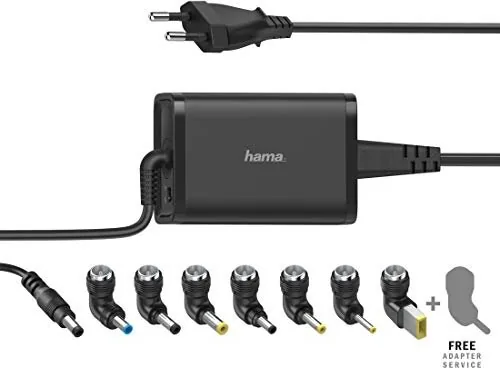
Hama Universal Notebook Power Supply 45W Manuale
Manuale PDF · 42 Pagine
Italiano



Controllo rapido
Risposta errata, riprova.
Chatta con il manuale del tuo Hama Universal Notebook Power Supply 45W utilizzando l'IA
Ottieni risposte istantanee dall'IA dal manuale del tuo Hama Universal Notebook Power Supply 45W
Chiedi qualsiasi cosa sul Hama Universal Notebook Power Supply 45W. Le risposte provengono da questo manuale, con le pagine di riferimento.
Fai una Domanda
Consigli Universal Notebook Power Supply 45W?
Sì NoDomande frequenti
The Hama Universal Power Supply has a rated output of 45 Watts. You must ensure your notebook's power consumption does not exceed this limit to avoid damaging the adapter or the device.
Questa risposta è utile?
Yes, the input voltage range is 100-240V, making it suitable for use globally. However, you may need a country-specific plug adapter depending on your location.
Questa risposta è utile?
Check the label on your original power supply or the user manual of your notebook. Set the switch to either 15V or 19V based on those specifications before plugging it in.
Questa risposta è utile?
You can request missing or lost connectors for free by contacting the Hama support hotline or visiting their official adapter service website. They will send available connectors to you at no cost.
Questa risposta è utile?
Only if your gaming laptop requires 15V or 19V and consumes less than 45W. Most high-end gaming laptops require more power and will not function correctly with this 45W unit.
Questa risposta è utile?
Yes, provided you have set the correct voltage and are using a properly grounded outlet. However, it is recommended to unplug the unit after use to save energy and reduce wear.
Questa risposta è utile?
No, the warranty covers manufacturing defects only. Damage resulting from improper installation, misuse, or opening the device voids the warranty entirely.
Questa risposta è utile?
Vantaggi e Svantaggi
Vantaggi

- Universal compatibility with 15V and 19V laptops
- Includes 7 different notebook connectors for broad coverage
- Global voltage support (100-240V) for international travel
- High efficiency rating of 89.6% reduces energy waste
- Free replacement connectors available through support service
Svantaggi

- Maximum output limited to 45W may not suit high-performance gaming laptops
- Requires manual voltage selection which adds a setup step
- Connector fitment depends on mechanical compatibility checks
- Power cord is fixed length and cannot be extended easily
- Not suitable for devices requiring voltages outside the 15-19V range
Prodotto Specifiche
Tipo
Terze parti
Tensione di ingresso
100-240V
Caratteristiche
include 8 adattatori
Descrizione del prodotto Descrizione
Hama Universal Power Supply 15-19V: The Ultimate Charging Solution
The Hama Universal Power Supply 15-19V is designed to replace lost or damaged chargers for a wide range of laptops and notebooks. This versatile adapter eliminates the need to carry multiple power bricks, offering a single solution for various devices requiring 15V or 19V DC input. With a robust 45W output capacity, it ensures your device stays powered efficiently during work or travel.
Why Choose This Adapter?
This universal unit features an adjustable voltage selector switch, allowing you to match the exact power requirements of your specific notebook. Whether your device needs 15V at 3.0A or 19V at 2.37A, this adapter delivers stable performance. It includes seven different notebook connectors in the package, covering most major brands on the market. The compact design fits easily into laptop bags, making it ideal for professionals who move between offices and homes.
Safety and Reliability
Safety is paramount with electrical accessories. The Hama adapter adheres to strict European safety standards and includes built-in protections against overheating and short circuits. The unit operates on a global input voltage range of 100-240V, meaning it can be used worldwide with just a simple plug adapter. Always ensure the total power consumption of your notebook does not exceed the 45W limit to prevent damage to both the adapter and your device.
Maintenance Tips
To keep your power supply in top condition, clean it regularly with a slightly damp, lint-free cloth. Avoid using aggressive cleaning agents that could damage the casing. Always disconnect the unit from the mains before cleaning. Never attempt to open the device yourself, as this voids the warranty and poses a risk of electric shock. If you lose a connector, Hama offers free replacements via their support service.
Important Notes
- Ensure your notebook requires exactly 15V or 19V before connecting.
- Do not change the voltage setting while the device is connected to the laptop.
- Keep the packaging out of reach of children due to suffocation risks.
- Dispose of the product according to local electronic waste regulations.
Cerca tra 67.732 manuali online


Digita il marchio o il modello