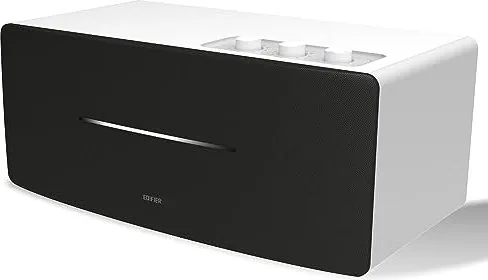
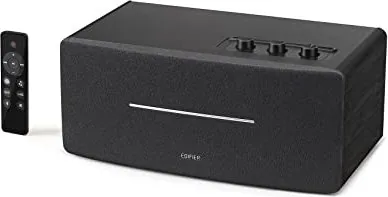
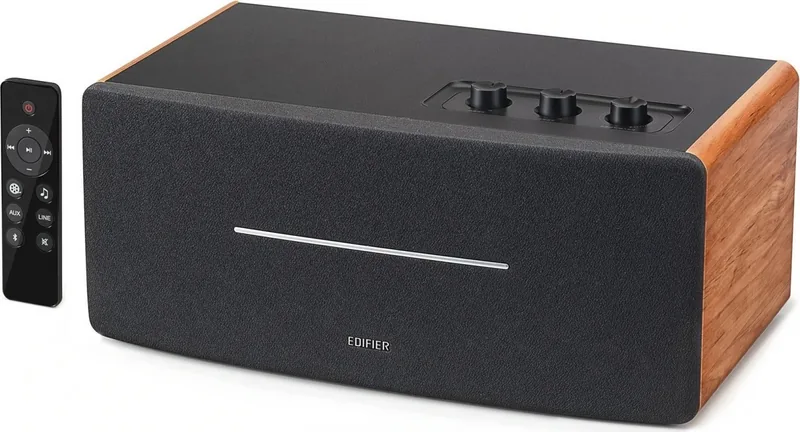
Примечание: Изображение приведено для справки. Конструкция может отличаться.
Иллюстрации
1. Переключатель питания
2. Кабель питания
3. Линейный выход
4. AUX вход
5. Линейный вход
6. Регулятор НЧ
7. Регулятор ВЧ
8. Управление общей громкостью/селектор входа
Переключатель режима входа: нажмите
Отключите Bluetooth: нажмите и удерживайте
(Bluetooth уже подключен)
Включение питания:
нажмите/нажмите и удерживайте
(когда питание выключается дистанционно и
переключатель питания уже включен)
Выключение питания: нажмите и удерживайте
9. Инфракрасный приемник/входной индикатор
Зеленая лампочка непрерывно горит:
AUX/линейный вход
Быстро мигает голубая лампочка:
Bluetooth не подключен
Голубая лампочка непрерывно горит:
Bluetooth уже подключен
Bluetooth вход
Выходная мощность: П/Л (ВЧ): 15 Вт+15 Вт
П/Л (средний диапазон и бас): 20 Вт+20 Вт
Частотный диапазон: 54Hz-20KHz
Звуковой вход: AUX, Линейный вход, Bluetooth
Звуковой выход: Линейный выход
Декларация для ЕС
Частотный диапазон Bluetooth: 2,402 ~ 2,480 ГГц
Радиочастотная выходная мощность: ≤20 дБм (EIRP)
Ограничения на эксплуатацию отсутствуют.
Пульт дистанционного управления (ДУ)
Подключения
Линейный вход
Руководство пользователя
Пульт дистанционного
управления (ДУ)
Колонка
Аудиокабель 3.5 mm-RCA
1. Включение/выключение
2. Увеличение громкости
3. Предыдущая /cледующая запись
(Bluetooth вход)
4. Пауза/воспроизведение
(Bluetooth вход)
5. Уменьшение громкости
6. Режим кино (расширенное
звуковое поле, идеален при
просмотре кинофильмов)
Примечание.
1. Не подвергайте пульт ДУ избыточному нагреву или воздействию влажности.
2. Не заряжайте батарейки.
3. Если изделие не используется длительное время, извлеките из него батарейки.
4. Не подвергайте батарейку сильному нагреву, например, прямой солнечный свет, огонь и т.п.
5. Опасность взрыва при неправильной установке батарейки. Заменяйте использованные батарейки
только на изделия такого же или аналогичного типа.
Установка батареек:
Для открывания отсека для батареек
см. рисунок, вставьте батарейку
CR2032 и закройте отсек.
или
• Нажмите регулятор "volume/input" на колонке для переключения в режим дополнительного
входа AUX (один раз мигнет зеленая лампочка) или в режим входной линии (зеленая лампочка
мигнет два раза).
• Соответственно нажмите кнопку "AUX"/"LINE" дистанционного управления для переключения в
режим дополнительного/линейного входа.
• Нажмите кнопку " " дистанционного управления или регулятор "volume/input" на колонке для
переключения в режим входа Bluetooth – голубая лампочка будет быстро мигать.
• Настройте мобильный телефон на поиск и подключение к "EDIFIER D12", причем после успешного
формирования пары голубая лампочка будет непрерывно гореть.
• Чтобы отключить Bluetooth, нажмите и удерживайте кнопку " " дистанционного управления или
нажмите и удерживайте 2 секунды регулятор "volume/input" на колонке.
Примечание:
• Для использования всех функций Bluetooth данного устройства, пожалуйста, обеспечьте в
подключаемом мобильном устройстве поддержку профиля A2DP(Advanced Audio Distribution
Profile, расширенный профиль распространения аудио) и AVRCP(Audio/Video Remote Control Profile,
профиль дистанционного управления аудио/видео).
• Подключение и совместимость по Bluetooth может отличаться в разных звуковых устройствах в
зависимости от версий программного обеспечения в них.
7. Режим музыки (отлично настроенный
собственный звук, идеален при
прослушивании музыки)
8. AUX вход
9. Линейный вход
10. Bluetooth вход
Hажмите и удерживайте для
отключения Bluetooth
11. Выключение звука
Примечание: В кинорежиме расширение звукового поля будет меняться,
иначе снижается качество звука. Поэтому, пожалуйста, разрешите режим
музыки при прослушивании музыкальных записей.
ПРЕДУПРЕЖДЕНИЕ!
1. Не проглатывать батарейку, Это опасно!
2. Изделие содержит дисковую батарейку. Проглоченная батарейка может вызвать травму или
смерть. Не храните новые или старые батарейки в местах, доступных для детей.
3. Если отсек для батареек закрывается неплотно, прекратите использовать пульт ДУ и храните его
вне доступа детей.
4. В случае подозрений на проглатывание батарейки немедленно обратитесь к врачу.
Устранение
• Проверьте, включен ли динамик.
• Попробуйте увеличить громкость с помощью главного регулятора или на пульте ДУ.
• Убедитесь, что аудиокабели подключены правильно, и в звуковых колонках правильно выбран
вход.
• Проверьте сигнал на выходе источника звука.
Не удается подключиться по Bluetooth
• Убедитесь, что колонка переключена на вход Bluetooth, поскольку в других входных режимах
невозможно создание пары или подключение по Bluetooth.
Отключитесь от Bluetooth-устройства нажав и удерживая кнопку " " в режиме Bluetooth, затем
повторите попытку.
• Рабочий диапазон передачи по Bluetooth составляет 10 метров, поэтому работайте только в этом
диапазоне.
• Попробуйте подключить другое устройство Bluetooth.
Колонка D12 не включается
• Убедитесь, что колонка подключена к сети электропитания, и что розетка сети включена.
Помехи от динамиков
• Колонки фирмы EDIFIER генерируют небольшие помехи, в то время как фоновые помехи
некоторых аудио устройств являются очень большими. Отсоедините аудио кабели и увеличите
громкость, если на расстоянии 1 м из динамика ничего не слышно, значит у этого изделия нет
проблем.
Дополнительные сведения о EDIFIER см. на веб-сайте www.edifier.com
Для запросов к EDIFIER по гарантийным обязательствам посетите страницу соответствующей
страны на www.edifier.com и ознакомьтесь с разделом гарантийных обязательств.
США и Канада: service@edifier.ca
Южная Америка: Информацию о местных представительствах см. на веб-сайте www.edifier.com
(английский язык) или www.edifierla.com (испанский/португальский язык).
Power
Off
On
или
или
Аудиокабель RCA-RCA
SpecificationsTroubleshooting
Box contents
Note: Images are for illustrative purposes only and may differ from the actual product.
Illustration
Bluetooth input
Power output: R/L(treble): 15W+15W
R/L(mid-range and bass): 20W+20W
Frequency response: 54Hz-20KHz
Audio input: AUX, Line in, Bluetooth
Audio output: Line out
Declaration for EU
Frequency Band: 2.402GHz ~ 2.480GHz
RF Power output: ≤20 dBm (EIRP)
There is no restriction of use.
Remote control
Connection
Line in input
User manual
Remote controlSpeaker
3.5mm-RCA audio cable
⑦⑧
⑥
③②①④⑤
⑨
⑦⑧
⑥
③②①④⑤
⑨
⑦⑧
⑥
③②①④⑤
⑨
⑦⑧
⑥
③②①④⑤
⑨
⑦⑧
⑥
③②①④⑤
⑨
⑦⑧
⑥
③②①④⑤
⑨
⑦⑧
⑥
③②①④⑤
⑨
⑦⑧
⑥
③②①④⑤
⑨
1. Power on/off
2. Volume up
3. Previous track/next track
(Bluetooth input)
4. Pause/play
(Bluetooth input)
5. Volume down
6. Movie mode
(extended sound field,
ideal for watching movie)
Note:
1. Do not place the remote control in places that are hot and humid.
2. Do not charge the batteries.
3. Remove the batteries when unused for a long period of time.
4. The battery should not be exposed to excessive heat such as direct sun, fire or similar.
5. Danger of explosion if battery is incorrectly replaced. Replace only with the same or equivalent type.
Battery loading:
Please refer to the illustration to open the battery
compartment, insert the CR2032 battery and
close the compartment.
or
• Press the "volume/input" dial on the speaker to switch to AUX input (green light flashing once) or Line in input (green light
flashing twice).
• Respectively press the "AUX" / "LINE" button on the remote control to switch to AUX/Line in input.
• Press the " " button on the remote control or press the "volume/input" dial on the speaker to switch to Bluetooth input,
blue light will flash rapidly.
• Set your mobile phone to search for and connect to "EDIFIER D12", after pairing is successful, the blue light will be steady lit.
• To disconnect Bluetooth, press and hold the " " button on the remote control or press and hold the "volume/input" dial on
the speaker for 2 seconds.
Note:
• To enjoy all Bluetooth functions of this product, please ensure your audio source device has A2DP (Advanced Audio Distribution
Profile) and AVRCP (Audio Video Remote Control Profile) profile.
• Bluetooth connectivity and compatibility may differ amongst different source devices, depending on the software versions of
source devices.
7. Music mode
(highly restored on-site sound,
ideal for listening to music)
8. AUX input
9. Line input
10. Bluetooth input
Press and hold to disconnect Bluetooth
11. Mute
Note: In Movie mode, the sound quality will be changed or distorted when the sound field is
extended. Therefore, please enable Music mode when listening to music.
WARNING!
1. Don’t swallow the battery; danger of chemical burn.
2. The product includes a wafer battery. Swallowing this battery may lead to injury or death. Do not place the new or old battery
in where children can get to it.
3. Don’t use the product if the battery cover is missing or not closed, and keep the remote inaccessible to children.
4. Please go to the hospital immediately if the battery is swallowed.
No sound
• Check if the speaker is ON.
• Try to turn up the volume using the volume control or remote control.
• Ensure the audio cables are firmly connected and the input is set correctly on the speaker.
• Check if there is a signal output from the audio source.
Cannot connect via Bluetooth
• Make sure the speaker is switched to Bluetooth input. If it is in other audio input modes, Bluetooth will not
connect. Disconnect from any Bluetooth device by pressing and holding the " " button, then try again.
• Effective Bluetooth transmission range is 10 meters; please ensure that operation is within that range.
• Try another Bluetooth device for connection.
The D12 does not turn on
• Check if main power is connected, or if the wall outlet is switched on.
Noise coming from speakers
• EDIFIER speakers generate little noise, while the background noise of some audio devices are too high. Please
unplug audio cables and turn the volume up, if no sound can be heard at 1 meter away from the speaker, then
there is no problem with this product.
1. Power switch
2. Power cable
3. Line out
4. AUX input
5. Line in
6. Bass dial
7. Treble dial
8. Volume control/input selector
Input mode switch: press
Disconnect Bluetooth: press and hold
(Bluetooth already connected)
Power on: press/press and hold
(when powered off via remote control,
and power switch already turned on)
Power off: press and hold
9. Infrared receiver/input indicator
Green light steady lit: AUX/Line in
Blue light flashing rapidly: Bluetooth unconnected
Blue light steady lit: Bluetooth already connected
Power
Off
On
or
or
To learn more about EDIFIER, please visit www.edifier.com
For EDIFIER warranty queries, please visit the relevant country page on www.edifier.com and review the section
titled Warranty Terms.
USA and Canada: service@edifier.ca
South America: Please visit www.edifier.com (English) or www.edifierla.com (Spanish/Portuguese) for local contact
information.
RCA-RCA audio cable
Substituição e instalação da bateria
Rode a tampa da bateria no sentido da seta e
retire-a, instale corretamente a bateria CR2032
no respetivo compartimento e, em seguida,
feche a tampa da bateria.
User manual | Manuel d’utilisateur | Manual de usuario | Bedienungsanleitung | Manuale dell’utente
Manual do utilizador |
ユーザーズガイド | Руководство пользователя
11
Français
12
Français
13
Français
14
Français
15
Français
16
Français
17
Français
20
Français
19
Français
18
Français
21
Español
22
Español
23
Español
24
Español
25
Español
26
Español
30
Español
29
Español
28
Español
27
Español
38
Deutsch
37
Deutsch
31
Deutsch
32
Deutsch
36
Deutsch
35
Deutsch
40
Deutsch
39
Deutsch
34
Deutsch
33
Deutsch
41
Italiano
45
Italiano
48
Italiano
47
Italiano
49
Italiano
46
Italiano
42
Italiano
50
Italiano
44
Italiano
43
Italiano
52
Português
54
Português
56
Português
55
Português
58
Português
57
Português
60
Português
59
Português
53
Português
51
Português
63
日本語
64
日本語
65
日本語
66
日本語
67
日本語
68
日本語
69
日本語
70
日本語
61
日本語
62
日本語
73
Русский
74
Русский
75
Русский
76
Русский
77
Русский
78
Русский
79
Русский
80
Русский
71
Русский
72
Русский
版本号及料号: V1.0/IB-200-D12000-00
名 称: D12(英法西德意葡日俄)说明书
材 质:
尺 寸: 127×127(MM) 校 对:
批 准:
东莞市漫步者科技有限公司
80g书纸
(
封面和底面用100g书纸)
对折,胶装
/1
%
Controllo rapido
Non sono un robot
Risposta errata, riprova.
Chatta con il manuale del tuo Edifier D12 utilizzando l'IA
Ottieni risposte istantanee dall'IA dal manuale del tuo Edifier D12
Chiedi qualsiasi cosa sul Edifier D12. Le risposte provengono da questo manuale, con le pagine di riferimento.
Fai una Domanda
0/1000
Consigli D12?
SìNo
Domande
frequenti
A
Enciende el altavoz y gira el selector de entrada hasta que la luz azul parpadee rápidamente. En tu teléfono, busca 'EDIFIER D12' en la configuración de Bluetooth y selecciónalo. Una vez conectado, la luz azul permanecerá sólida.
Questa risposta è utile?
A
El Modo Cine expande el campo sonoro para una experiencia más inmersiva ideal para ver películas. El Modo Música proporciona una firma de sonido altamente restaurada y precisa perfecta para escuchar grabaciones musicales.
Questa risposta è utile?
A
Sí. Puedes conectar dispositivos externos usando la entrada AUX con un cable de 3.5mm o la entrada de línea con cables RCA. Simplemente cambia el modo de entrada usando el dial o el control remoto.
Questa risposta è utile?
A
Para desconectar, mantén presionado el botón Bluetooth en el control remoto o el dial de volumen/entrada en el altavoz durante dos segundos mientras estás en el modo Bluetooth.
Questa risposta è utile?
A
Primero, verifica que el altavoz esté encendido y el volumen subido. Comprueba que los cables de audio estén conectados firmemente y que la fuente de entrada correcta esté seleccionada. Asegúrate de que tu dispositivo de origen esté realmente emitiendo audio.
Questa risposta è utile?
A
No, el control remoto usa una batería de botón CR2032 que no es recargable. Reemplázala con un tipo equivalente cuando la batería se agote.
Questa risposta è utile?
A
El rango de transmisión efectivo es de 10 metros. Asegúrate de que tu dispositivo permanezca dentro de esta distancia para una conexión estable.
Questa risposta è utile?
M: QW-35-FL
Vantaggie
Svantaggi
Vantaggi
Salida de audio de alta calidad con 40W de potencia total
Opciones de conectividad versátiles incluyendo Bluetooth, AUX y Entrada de línea
Modos dedicados de Cine y Música para diferentes tipos de contenido
Incluye control remoto para operación conveniente
Dialécticos de graves y agudos ajustables para sintonización personalizada del sonido
VS
Svantaggi
Rango Bluetooth limitado a aproximadamente 10 metros
Sin batería recargable incorporada; requiere toma de corriente constante
El control remoto usa batería de botón no recargable
El modo Cine puede distorsionar la calidad de sonido para la escucha de música
Los indicadores LED pueden ser difíciles de ver en entornos brillantes
M: QW-35-FL
Prodotto
Specifiche
Potenza
70W RMS
Display
No
Sintonizzatore
No
Fascia di frequenza
54Hz-20kHz
Connessioni
Ingresso AUX (Jack 3,5mm), Ingresso linea stereo (RCA), Uscita linea stereo (Jack 3,5mm)
Wireless
Bluetooth 5.0
Alimentazione
Alimentazione CA
Caratteristiche
Telecomando
Dimensioni
35,9x20,3x15,9 cm (LxPxA)
Peso
4,6 kg
M: QW-35-FL
Descrizione del prodotto
Descrizione
Descubre el Altavoz Bluetooth Estéreo Edifier D12
El Edifier D12 es un altavoz estéreo versátil diseñado para llevar audio de alta calidad a tu configuración de entretenimiento en casa. Ya sea que estés transmitiendo música de forma inalámbrica o conectándote mediante cables tradicionales, este dispositivo ofrece una experiencia de escucha perfecta. Con su diseño elegante y conjunto robusto de funciones, se destaca como una excelente opción tanto para audiófilos como para oyentes casuales.
En el corazón del D12 hay dos controladores potentes capaces de entregar 40 vatios de salida total. El sistema separa las frecuencias efectivamente, proporcionando agudos nítidos de 15W por canal y graves profundos y resonantes con tonos medios de 20W por canal. Este equilibrio asegura que cada nota de tu lista de reproducción favorita se reproduzca con claridad y profundidad. La respuesta de frecuencia oscila entre 54Hz y 20KHz, cubriendo la gran mayoría de sonidos audibles.
La conectividad es donde el D12 realmente brilla. Soporta múltiples métodos de entrada incluyendo Bluetooth, AUX y Entrada de línea. El módulo Bluetooth opera dentro de la banda estándar de 2.4GHz, permitiendo una conexión estable hasta 10 metros de distancia. Una vez emparejado con tu teléfono inteligente o tableta, la luz indicadora azul confirma un enlace exitoso. Para aquellos que prefieren conexiones cableadas, el panel trasero cuenta con entradas dedicadas para cables RCA y de 3.5mm, haciéndolo compatible con dispositivos antiguos y computadoras modernas por igual.
El control remoto incluido añade una capa de conveniencia, permitiéndote gestionar el volumen, cambiar pistas y alternar entre modos sin levantarte de tu asiento. Dos perfiles de sonido distintos están disponibles: Modo Cine expande el campo sonoro para experiencias cinematográficas inmersivas, mientras que Modo Música restaura la fidelidad original de tus grabaciones para un disfrute acústico puro. Los usuarios también pueden ajustar los niveles de graves y agudos usando los dialécticos en el altavoz para adaptar el sonido a su preferencia personal.
La instalación es sencilla, requiriendo solo un cable de alimentación y tu fuente de audio elegida. La unidad cuenta con indicadores LED claros para mostrar el estado de entrada actual, asegurando que siempre sepas qué modo está activo. Las advertencias de seguridad sobre la batería de botón en el control remoto son prominentes, enfatizando la importancia de mantener las baterías de repuesto lejos de los niños.
Resumen de Características Principales
Salida Potente: 15W agudos + 20W graves/medio por canal para un sonido rico.
Soporte Multi-Entrada: Conecta vía Bluetooth, AUX o Entrada de línea fácilmente.
Control Remoto: Funcionalidad completa para volumen, reproducción y cambio de modos.
Modos de Sonido: Elige entre Modo Cine para películas y Modo Música para álbumes.
EQ Ajustable: Dialécticos dedicados para afinar finamente los niveles de graves y agudos.
Notas Importantes
Asegúrate siempre de que la tapa de la batería esté segura en el control remoto para prevenir riesgos de ingestión accidental. Si experimentas problemas de ruido, verifica que ningún otro dispositivo de audio esté generando interferencia excesiva de fondo. Para soporte de garantía, visita el sitio web oficial de Edifier para tu región específica.