
Conceptronic LORCAN ERGO Manuale
Manuale PDF · 3 Pagine
Italiano



Controllo rapido
Risposta errata, riprova.
Chatta con il manuale del tuo Conceptronic LORCAN ERGO utilizzando l'IA
Ottieni risposte istantanee dall'IA dal manuale del tuo Conceptronic LORCAN ERGO
Chiedi qualsiasi cosa sul Conceptronic LORCAN ERGO. Le risposte provengono da questo manuale, con le pagine di riferimento.
Fai una Domanda
Consigli LORCAN ERGO?
Sì NoDomande frequenti
Insert an AA battery, turn on Bluetooth, and long press left button, scroll wheel, and right button for four to six seconds.
Questa risposta è utile?
This mouse uses a single standard AA battery which is included in the packaging for immediate setup.
Questa risposta è utile?
If a password is requested during the pairing process, the default code to enter is 0000.
Questa risposta è utile?
No, the mouse is not rechargeable and functions using standard replaceable AA batteries.
Questa risposta è utile?
Yes, the mouse is compatible with tablets and PCs that support standard Bluetooth connections.
Questa risposta è utile?
This is a 6-button Ergonomic Bluetooth Mouse offering multiple functional controls.
Questa risposta è utile?
Vantaggi e Svantaggi
Vantaggi

- Ergonomic shape reduces wrist strain during long sessions comfortably
- Six buttons allow for customizable productivity shortcuts
- Wireless Bluetooth 3.0 connectivity eliminates cable clutter
- Standard AA battery allows for easy replacement and long life
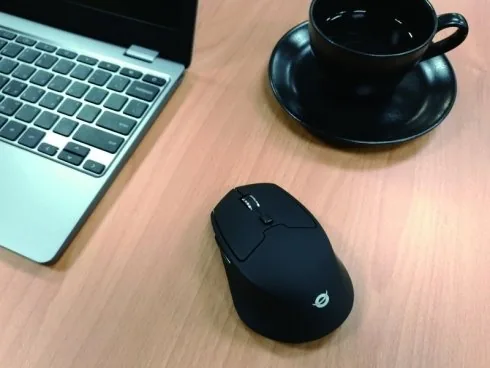
- Sleek black design looks professional on any modern desk
Svantaggi

- Requires external AA battery instead of built-in rechargeable
- Specific button combination is needed to initiate pairing mode
- Connection relies on third-party OS Bluetooth support
- Not waterproof or durable against liquid damage spills
- Fixed speed may not suit high precision gaming needs
Prodotto Specifiche
Mano
Mano destra
Pulsanti
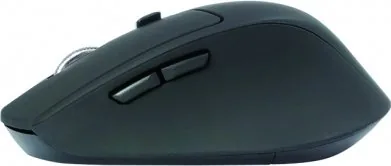
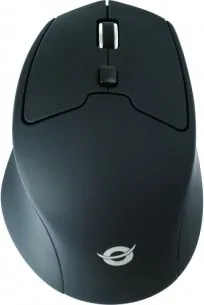
6 (totale), 2 (principali), 1 (superiore), 2 (laterali), 1 (clic rotella)
Rotella di scorrimento
1x a 2 vie
Tecnologia di tracciamento
LED-rosso/IR
Risoluzione
1600 DPI, riducibile a 1200/800 DPI
Illuminazione
Nessuna
Connessione
Senza fili (Bluetooth 3.0)
Alimentazione
1x AA
Dimensioni (LxHxP)
7,49x4,19x11,40cm
Volume approssimativo
94,06 cm3 (forma approssimativa)
Peso
225,10 g
Colore
solido, nero, logo
Caratteristiche
Appoggio per il pollice, superficie antiscivolo (rivestimento in gomma completo)
Descrizione del prodotto Descrizione
Discover Seamless Wireless Computing with the Conceptronic LORCAN ERGO Bluetooth 3.0 Black Mouse
Are you ready to upgrade your workspace efficiency today? The Conceptronic LORCAN ERGO Bluetooth 3.0 Black Mouse offers a pristine blend of comfort and functionality for modern users everywhere. This device is specifically designed to handle the daily demands of digital workflows while keeping your desk organized and clean. When you need a reliable peripheral for your daily tasks, this mouse stands out among competitors due to its thoughtful engineering and advanced wireless capabilities. It is essential to understand the setup process to get the most out of your purchased hardware immediately. A detailed Bluetooth Manual is recommended for initial configuration steps, although the procedures are very straightforward for most users to follow easily.
Ergonomic Design for Extended Use
Comfort is a major factor when selecting a mouse for everyday professional tasks. The ergonomic shape of this unit helps reduce wrist strain during long working periods significantly. It fits naturally in the hand, promoting good posture and minimizing fatigue over several hours. The sleek black finish ensures it looks professional next to laptops or tablets securely. Unlike bulky gaming mice, this option focuses on practical utility for office environments consistently. The surface texture provides a secure grip, preventing accidental slips during sensitive operation.
Wireless Connectivity and Power
Connectivity is handled through Bluetooth 3.0 technology, which ensures a stable link without the hassle of physical wires. You will not need annoying dongles or extra USB receivers cluttering your available ports. Powering the device requires a standard AA battery, which is conveniently inserted into the compartment at the bottom. This design choice allows users to swap depleted batteries quickly for extended uptime throughout the day. The battery indicators are reliable, ensuring you know when maintenance is needed before issues arise.
Setup and Functionality
Pairing your device involves a specific sequence to ensure security and connection stability always. Once the battery is installed and the computer is ready, you must activate Bluetooth settings on your operating system carefully. To initiate the connection, hold the left button, scroll wheel, and right button simultaneously for about four to six seconds. This action triggers the pairing mode on the hardware unit effectively every time. If prompted for a password during the setup process, the default code is simply zero zero zero zero. This process is documented clearly in the official guide provided by the manufacturer, ensuring clarity for all users worldwide. The mouse features six buttons, allowing for customizable shortcuts that enhance productivity significantly for power users daily. Whether for simple web browsing or complex document editing, the versatility of the controls is evident throughout daily business use. You can assign different functions to maximize your workflow efficiency without any interruption or lag. The wireless range is standard sufficient for typical desk setups, allowing movement without loss of signal.
This mouse represents a solid investment for anyone seeking a reliable wireless solution in the market. The combination of ergonomic benefits and straightforward setup makes it a top choice for productivity enthusiasts globally. It works exceptionally well with various tablets and PCs running modern operating systems reliably. By following standard procedures, you can ensure a smooth user experience from the very first day of use consistently. It eliminates cable clutter and provides freedom of movement that wired mice simply cannot match easily. Overall, it is a dependable tool for professionals who value precision and ease of connection.
Cerca di 67.706 Manuali online


Digita il marchio o il modello