Manual.ly Logo

Cameo NanoSpot 300 Manuale

0,0 · 0 Valutazioni

Manuale PDF · 60 Pagine

Italiano

M: GO-GEM-FL-25
pagina

/ 60

Loading...
0158e907e462386cfa987a389a04f937dc7d page 3
ITALIANOPOLSKIESPAÑOL
FRANCAISDEUTSCHENGLISH
3
DMX
ENGLISH
YOU‘VE MADE THE RIGHT CHOICE!
We have designed this product to operate reliably over many years. Please read this User‘s Manual carefully, so that you can begin making
optimum use of your Cameo Light product quickly. Learn more about Cameo Light on our website WWW.CAMEOLIGHT.COM.
PREVENTIVE MEASURES
1. Please read these instructions carefully.
2. Keep all information and instructions in a safe place.
3. Follow the instructions.
4. Observe all safety warnings. Never remove safety warnings or other information from the equipment.
5. Use the equipment only in the intended manner and for the intended purpose.
6. Use only sufficiently stable and compatible stands and/or mounts (for fixed installations). Make certain that wall mounts are properly installed and
secured. Make certain that the equipment is installed securely and cannot fall down.
7. During installation, observ e the applicable safety regulations for your country.
8. Never install and operate the equipment near radiators, heat registers, ovens or other sources of heat. Make certain that the equipment is
always installed so that is cooled sufficiently and cannot overheat.
9. Never place sources of ignition, e.g., burning candles, on the equipment.
10. Ventilation slits must not be blocked.
11. This appliance is designed exclusively for indoor use, do not use this equipment in the immediate vicinity of water (does not apply
to special outdoor equipment - in this case, observe the special instructions noted below). Do not expose this equipment to flammable
materials, fluids or gases.
12. Make certain that dripping or splashed water cannot enter the equipment. Do not place containers filled with liquids, such as vases or
drinking vessels, on the equipment.
13. Make certain that objects cannot fall into the device.
14. Use this equipment only with the accessories recommended and intended by the manufacturer.
15. Do not open or modify this equipment.
16. After connecting the equipment, check all cables in order to prevent damage or accidents, e.g., due to tripping hazards.
17. During transport, make certain that the equipment cannot fall down and possibly cause property damage and personal injuries.
18. If your equipment is no longer functioning properly, if fluids or objects have gotten inside the equipment or if it has been damaged in
anot her way, switch it off immediately and unplug it from the mains outlet (if it is a powered device). This equipment may only be repaired
by authorized, qualified personnel.
19. Clean the equipment using a dry cloth.
20. Comply with all applicable disposal laws in your country. During disposal of packaging, please separate plastic and paper/cardboard.
21. Plastic bags must be kept out of reach of children.
FOR EQUIPMENT THAT CONNECTS TO THE POWER MAINS:
22. CAUTION: If the power cord of the device is equipped with an earthing contact, then it must be connected to an outlet with a protective
ground. Never deactivate the protective ground of a power cord.
23. If the equipment has been exposed to strong fluctuations in temperature (for example, after transport), do not switch it on immediately.
Moisture and condensation could damage the equipment. Do not switch on the equipment until it has reached room temperature.
24. Before connecting the equipment to the power outlet, first verify that the mains voltage and frequency match the values specified on the
equipment. If the equipment has a voltage selection switch, connect the equipment to the power outlet only if the equipment values and the
mains power values match. If the included power cord or power adapter does not fit in your wall outlet, contact your electrician.
25. Do not step on the power cord. Make certain that the power cable does not become kinked, especially at the mains outlet and/or power
adapter and the equipment connector.
26. When connecting the equipment, make certain that the power cord or power adapter is always freely accessible. Always disconnect the
equipment from the power supply if the equipment is not in use or if you want to clean the equipment. Always unplug the power cord and
power adapter from the power outlet at the plug or adapter and not by pulling on the cord. Never touch the power cord and power adapter
with wet hands.
27. Whenever possible, avoid switching the equipment on and off in quick succession because otherwise this can shorten the useful life of
the equipment.
28. IMPORTANT INFORMATION: Replace fuses only with fuses of the same type and rating. If a fuse blows repeatedly, please contact an
authorised service centre.
29. To disconnect the equipment from the power mains completely, unplug the power cord or power adapter from the power outlet.
30. If your device is equipped with a Volex power connector, the mating Volex equipment connector must be unlocked before it can be re-
moved. However, this also means that the equipment can slide and fall down if the power cable is pulled, which can lead to personal injuries
and/or other damage. For this reason, always be careful when laying cables.
31. Unplug the power cord and power adapter from the power outlet if there is a risk of a lightning strike or before extended periods of disuse.
32. The device must only be installed in a voltage-free condition (disconnect the mains plug from the mains).
33. Dust and other debris inside the unit may cause damage. The unit should be regularly serviced or cleaned (no guarantee) depending on
ambient conditions (dust etc., nicotine, fog) by qualified personnel to prevent overheating and malfunction.
34. Please keep a distance of at least 0.5 m to any combustible materials.
35. Power cables to power multiple devices must have a cross-section of at least 1.5 mm². Within the EU, the cables must correspond to
H05VV-F, or similar. Suitable cables are offered by Adam Hall. With these cables, you can connect multiple devices via the power OUT con-
nection to the power IN connection of an additional device. Make sure that the total current consumption of all connected devices does not
exceed the specified value on all connected devices (label on the device). Make sure to keep power cable connections as short as possible.

Chatta con il manuale del tuo Cameo NanoSpot 300 utilizzando l'IA

Ottieni risposte istantanee dall'IA dal manuale del tuo Cameo NanoSpot 300

Chiedi qualsiasi cosa sul Cameo NanoSpot 300. Le risposte provengono da questo manuale, con le pagine di riferimento.

NanoSpot 300 Programma di manutenzione

Regolarmente
Pulire l'esterno dell'apparecchiatura

Utilizzare un panno asciutto per pulire l'apparecchiatura. Non utilizzare panni umidi.

Mostra nel manuale (pagina 3)
Regolarmente
Effettuare la manutenzione e pulire l'unità interna

A seconda delle condizioni ambientali come polvere o fumo, il personale qualificato dovrebbe effettuare la manutenzione e pulire regolarmente l'unità per prevenire surriscaldamento e malfunzionamenti.

Mostra nel manuale (pagina 3)
M: QW-35-FL

Fai una Domanda

0/1000

Consigli NanoSpot 300?

Sì No

Domande frequenti

A

Utilizza un singolo LED bianco freddo da 30 W. Questo offre alla fixture un'uscita luminosa intensa e focalizzata, ideale per effetti beam nitidi, gobos e show con testa mobile in spazi compatti e di medie dimensioni.

Questa risposta è utile?

A

La fixture supporta il controllo DMX, il controllo tramite telecomando IR, i programmi automatici standalone, l'attivazione sonora tramite il microfono integrato e il funzionamento master/slave. Questo la rende utile sia per setup semplici sia avanzati.

Questa risposta è utile?

A

Può funzionare in modalità DMX a 5 canali, 9 canali o 11 canali. La modalità scelta dipende da quanto controllo desideri su movimento, colori, gobos, effetti e automazione.

Questa risposta è utile?

A

Sì. Puoi usarla in modalità automatica standalone, utilizzare l'attivazione sonora o controllarla con il telecomando a infrarossi incluso. Una console è necessaria solo se desideri una programmazione DMX completa.

Questa risposta è utile?

A

Sì, ma solo con l'hardware di montaggio incluso e un cavo di sicurezza adeguato. L'installazione sospesa dovrebbe essere eseguita da personale qualificato per garantire un rigging sicuro e affidabile.

Questa risposta è utile?

A

Il NanoSpot 300 offre movimento pan e tilt, cambi colore, gobos, strobo, dimmer e diversi programmi show integrati. È progettato per creare rapidamente look scenici vivaci e dinamici.

Questa risposta è utile?

M: GO-GEM-FL-25

Vantaggi e Svantaggi

Vantaggi

  • Testa mobile compatta da 30 W con forte output del fascio e risposta rapida.
  • Offre opzioni di controllo DMX, telecomando IR, auto, sound e master/slave.
  • Ampio range di movimento con pan a 540° e tilt a 230° per un posizionamento flessibile.
  • Include 7 colori, 7 gobos, strobo, dimmer e programmi show integrati.
VS

Svantaggi

  • Progettata solo per uso indoor, quindi non è adatta ad ambienti esterni.
  • L'output è focalizzato e funzionale, ma non pensato per venue molto grandi.
  • La configurazione DMX corretta può richiedere una certa conoscenza tecnica per ottenere i migliori risultati.
  • Il raffreddamento a ventola e le parti mobili richiedono una manutenzione regolare e un montaggio sicuro.
M: GO-GEM-FL-25

Prodotto Specifiche

Tipo di fascio

Fascio

Sorgente luminosa

LED

Consumo energetico

30W

Angolo PAN

540°

Angolo TILT

230°

Miscelazione colori

LED

Effetti

Dimmer, Strobo

Controllo

DMX, Controllo sonoro, Master/Slave

M: GO-GEM-FL-25

Descrizione del prodotto Descrizione

Cameo NanoSpot 300 Manual: Un testa mobile compatta con grande energia da palco

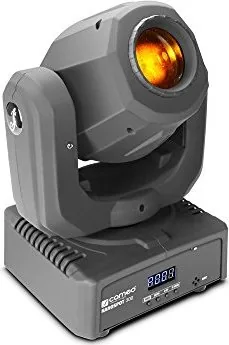
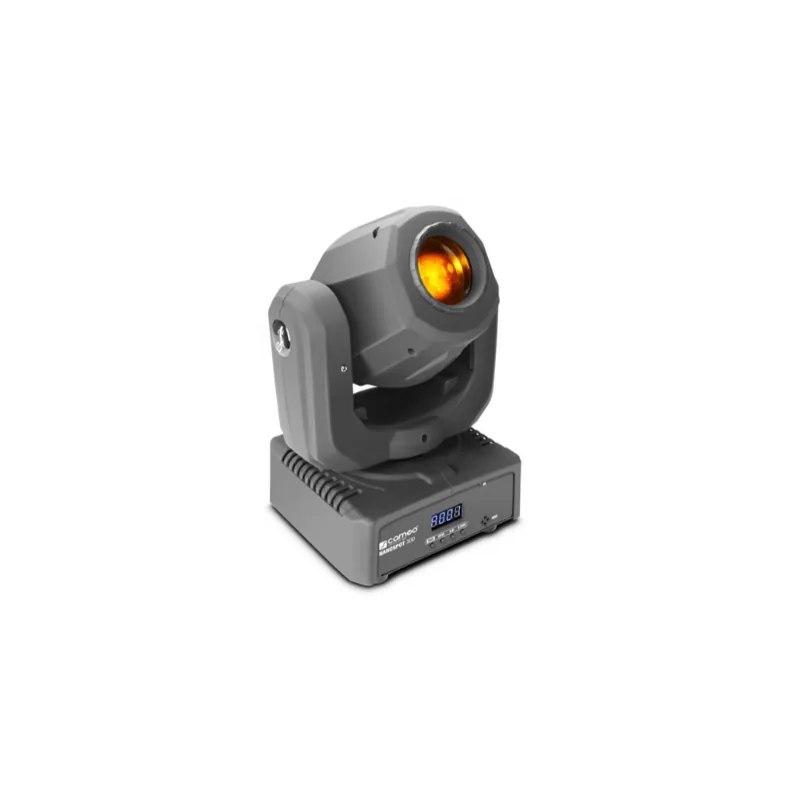
Il Cameo NanoSpot 300 è una testa mobile compatta progettata per show luminosi flessibili e di grande impatto visivo. Basata su un LED bianco freddo da 30 W, combina un fascio nitido, cambi colore vivaci e una versatile ruota gobos in un formato leggero adatto a piccoli palchi, setup mobili, club e spazi per eventi. Nonostante le dimensioni, offre il tipo di movimento e controllo solitamente associato a fixture più grandi.

Una delle sue qualità più forti è l'adattabilità. L'unità supporta il controllo DMX in modalità a 5 canali, 9 canali e 11 canali, offrendo agli operatori luci un percorso semplice sia per una configurazione base sia per una programmazione più dettagliata. Se preferisci un funzionamento rapido, il telecomando IR incluso rende facile attivare colori, gobos, effetti stroboscopici, variazioni di luminosità e programmi show senza entrare nei menu. Supporta anche programmi automatici standalone, funzionamento attivato dal suono tramite il microfono integrato e sincronizzazione master/slave per effetti coordinati su più fixture.

Il range di movimento è impressionante per una mini fixture, con copertura pan di 540° e tilt di 230°. Ciò significa che il NanoSpot 300 può spazzare una sala o agganciarsi a un bersaglio con precisione. La ruota colori offre sette colori più open, mentre la ruota gobos fornisce sette gobos più open, rendendo facile creare fasci dinamici, effetti testurizzati e transizioni rapide. La lente di proiezione può anche essere messa a fuoco per diverse distanze di tiro, aggiungendo un controllo utile nelle configurazioni reali.

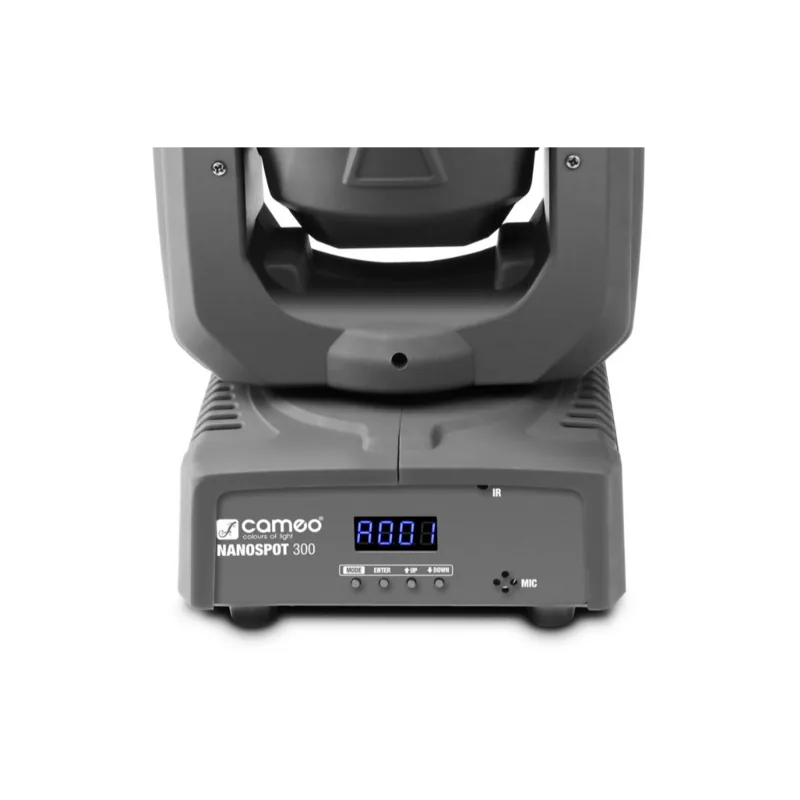
L'installazione è semplice e pratica. La fixture include piedini in gomma per il posizionamento a terra, oltre a una staffa omega e un punto di sicurezza per il montaggio su truss. Un display LED a 4 cifre e quattro pulsanti di controllo forniscono accesso diretto alle impostazioni di indirizzo, alle modalità operative, alle preferenze di sistema e alla selezione degli show. Per l'uso in eventi al chiuso, è uno strumento compatto che bilancia mobilità, controllo e impatto visivo.

Note

  • Destinato all'uso indoor e ad applicazioni di illuminazione professionale.
  • I risultati migliori si ottengono con un raffreddamento adeguato, un montaggio accurato e una gestione pulita dei cavi.
  • I terminatori DMX e l'indirizzamento corretto aiutano a mantenere un flusso del segnale affidabile.
M: GO-GEM-FL-25

© Copyright 2026 Manual.ly